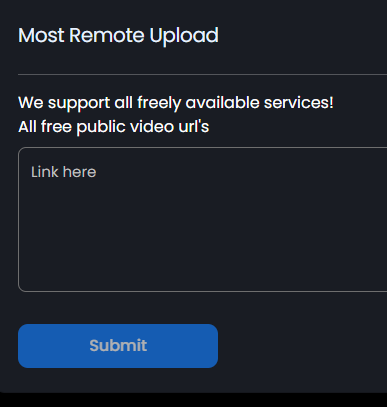
We don't have a progress bar right now. That is on the to-do list. We do have this on the staging server right now. It will allow you to upload many different links at the same time:
Can you send an example of the link? And what's your account email?
Post automatically merged:
We pushed new code to the live server, and there was an issue with a small line of javascript code. We're reverting the changes. It might take a few hours for the changes to show.. Sorry about this!!
If you request a payout, let me know your email and we'll give you a boost. Apologies.
Hi guys, is there any chance you could forward me a list of current hosts which work in regards to remote upload please? (Not an exhaustive one, but just the main hosts)
Hi guys, is there any chance you could forward me a list of current hosts which work in regards to remote upload please? (Not an exhaustive one, but just the main hosts)
Developers are back online in 3 hours, then it will be fixed, quickly.
FOR NOW, Select "Normal Ads" in your settings and it will go away.
I'll message here when it is fixed.
Post automatically merged:
The video error code is fixed. You can go back to Maximum Ads. If this affected you, message me and we'll get it sorted out : )
Post automatically merged:
Some updates:
- Started integrating JDownloader for remote upload.
- Added "no-follow" script to our website (helps our domain not get banned)
- Added API for getting the user's storage usage and check if their storage limit is exceeded or not
- Added the "select all" checkbox to make it easier to export/share files
- Removed the current UI for remote upload and added a text-area to enter multiple URLs, with logic separating the URLs using regex
- Custom thumbnail options
To do next:
- Finish JDownloader (This will allow remote upload from Doodstream and other hosts)
- Extract subtitles from mkv file
- Add every language in the subtitle option
- Don't count VPN & proxy traffic / views
- Force adblock
- Increase default subtitle size by 2x
- Add 2 other player options that user can choose from (JWPlayer and Vidstack player)
Another thing I noticed recently is that when you go views-statistics, it only shows individual views but not daily views (like on January 20 100, on January 21 - 250 views etc), it just looks like something different and you can check it out yourself. This isn't a major problem but definitely should be fixed as it allows us to analyze our earnings on each day individually to check and overlook if everything is fine or not and if our earnings decreased or increased from other days.
Another thing I noticed recently is that when you go views-statistics, it only shows individual views but not daily views (like on January 20 100, on January 21 - 250 views etc), it just looks like something different and you can check it out yourself. This isn't a major problem but definitely should be fixed as it allows us to analyze our earnings on each day individually to check and overlook if everything is fine or not and if our earnings decreased or increased from other days.
It's not compatible yet. Right now you can upload via website, API, FTP, Zoom, or Thema
Also, here are some updates:
- We have added multi-audio capabilities
- Fixed a download button issue
- Increased default subtitle size by 2x
- Added pin/unpin to subtitles to make it quicker to mass-upload subtitles
- Working on showing remote upload progress bar & Doodstream compatibility
- And more
Also pm'ed about it, but it's really untransparent right now because we can't see daily total statistics (views + earnings)
For example, January 23 - 2000 views - $5
January 24 - 10000 views - $15
January 25 - 5000 views - $7
It only shows hourly and individually and it only shows total views on dashboard (even if it says from last 24 hours, it's not true) and statistics page is completely broken even if you apply "daily", we need to be able to check if views counting has improved itself or worsened daily and right now it's impossible to see. Please fix it ASAP.
Post automatically merged:
In Dashboard it also shows "Views in last 24 hours" But are they total views or since really in last 24 hours? Cause if "views in last 24 hours", then it doesn't really make sense cause earnings are then much lower and not really for last 24 hours but since traffic started.
It all needs to be fixed fast, it's been broken for so long.
It only shows hourly and individually and it only shows total views on dashboard (even if it says from last 24 hours, it's not true) and statistics page is completely broken even if you apply "daily", we need to be able to check if views counting has improved itself or worsened daily and right now it's impossible to see. Please fix it ASAP.
This site uses cookies to help personalise content, tailor your experience and to keep you logged in if you register.
By continuing to use this site, you are consenting to our use of cookies.