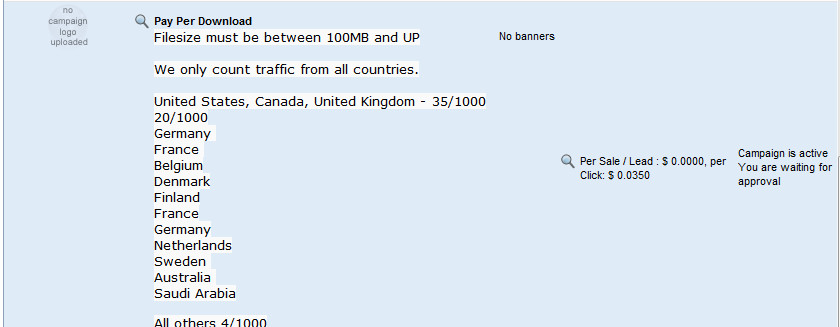
Ultramegabit Pay-Per Download $35/1000 - PPS 75% - Rebill 60/40

Status
Not open for further replies.
Not Found

The requested URL ************panel.php was not found on this server.
Additionally, a 404 Not Found error was encountered while trying to use an ErrorDocument to handle the request.
 
@luffy because you were in the PPD campaign at the time of the sale. You wouldn't get a commission.

The sale was made at 09/16/2012 02:08:51

you were approved for PPS campaign at 09/16/2012 09:30:03
 
1)
remote upload always fail, and save a small kb files :(

2)
why it is not showing any status for remote upload, it always loading and loading.....??

3)
not able to "enter" one by one link in remote upload box, only thing is we need to copy all links in notepad then need to paste all , please fix it

4)
waiting for ftp, because remote upload always sucks

5)
how to add Rapidshare username/pass, because
http://username:pass@... is not working
 
Not Found

The requested URL ************panel.php was not found on this server.
Additionally, a 404 Not Found error was encountered while trying to use an ErrorDocument to handle the request.

flush your dns, or wait for it to propagate.

1. Use a direct download link URL. We don't have XFS, we don't have rapidleech integrated into our script.
2. This is being worked on.
3. Why would you want to enter one by one link? You can paste them all? It's the same exact thing
4.read previous posts about why FTP is off. Remote may suck for you, because you are not using direct download links, but for 100's of other users who are using the tool correctly, it's just great, and extremely fast.
5. refer to 1.

1)
remote upload always fail, and save a small kb files :(

2)
why it is not showing any status for remote upload, it always loading and loading.....??

3)
not able to "enter" one by one link in remote upload box, only thing is we need to copy all links in notepad then need to paste all , please fix it

4)
waiting for ftp, because remote upload always sucks

5)
how to add Rapidshare username/pass, because
http://username:pass@... is not working


---------- Post added at 09:23 AM ---------- Previous post was at 09:23 AM ----------

1. Use a direct download link URL. We don't have XFS, we don't have rapidleech integrated into our script.
2. This is being worked on.
3. Why would you want to enter one by one link? You can paste them all? It's the same exact thing
4.read previous posts about why FTP is off. Remote may suck for you, because you are not using direct download links, but for 100's of other users who are using the tool correctly, it's just great, and extremely fast.
5. refer to 1.

1)
remote upload always fail, and save a small kb files :(

2)
why it is not showing any status for remote upload, it always loading and loading.....??

3)
not able to "enter" one by one link in remote upload box, only thing is we need to copy all links in notepad then need to paste all , please fix it

4)
waiting for ftp, because remote upload always sucks

5)
how to add Rapidshare username/pass, because
http://username:pass@... is not working
 
but, what about remote upload status? any speed>My last two files show me loading...loading... and finally it fails, but when I check file manager it was uploaded.
 
ok, admin, this is shit, I'm waiting for User account to approve my affiliated over 6hrs, but it's it still inactive? wtf?
your affiliated manager really bothering.
 
if your affiliate id wasn't activated, this is because you didn't follow the directions, and your account was deleted. 100's of other people have managed to join with no problem? Refer to page 1. please.

thank you.

Everything should be back to normal now guys.
 
Status
Not open for further replies.
Back
Top