Guest viewing is limited
- You have a limited number of page views remaining
- 9 guest views remaining
- Register now to remove this limitation
- Already a member? Click here to login


You are using an out of date browser. It may not display this or other websites correctly.
You should upgrade or use an alternative browser.
You should upgrade or use an alternative browser.
gounlimited.to | BANNED FROM WJ
- Thread starter GO Unlimited
- Start date




- Status
- Not open for further replies.
Luckycharm
Active Member
Tnx for payment
Bounce credit pm sent my username

Bounce credit pm sent my username


HeatherLee
Active Member
Zoom seems to be running SUPER slow tonight.
I've uploaded via web upload with no problem.
I've uploaded via web upload with no problem.

GO Unlimited
Active Member
ZOOM Is basically a web uploader, which means both of ZOOM and webupload should have the same experience but considering that most browsers have some virtual uploading limits, ZOOM is much faster than them, just because it breaks that limit. But considering that you’re having the opposite of the experience you must be having, I guess ZOOM is trying to connect into an overloaded server. I suggest you to close and re-open ZOOM to be assigned into a different server.Zoom seems to be running SUPER slow tonight.
I've uploaded via web upload with no problem.
HeatherLee
Active Member
Already uploaded but I'll try that next time.ZOOM Is basically a web uploader, which means both of ZOOM and webupload should have the same experience but considering that most browsers have some virtual uploading limits, ZOOM is much faster than them, just because it breaks that limit. But considering that you’re having the opposite of the experience you must be having, I guess ZOOM is trying to connect into an overloaded server. I suggest you to close and re-open ZOOM to be assigned into a different server.
GO Unlimited
Active Member
Please keep me posted by then if the issue has been resolved or not.Already uploaded but I'll try that next time.

Tnx for payment
Bounce credit pm sent my username
Thanks for share. Bounce credited.

GO Unlimited
Active Member
It seems you’re living above the data center. Thank you for always keeping us updated with your great experience.Zoom upload is stable and very high speed
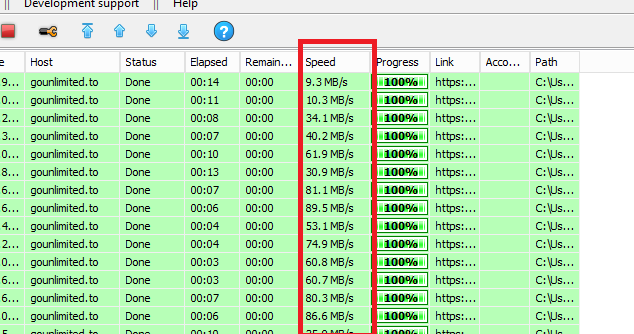


Thank youIt seems you’re living above the data center. Thank you for always keeping us updated with your great experience.
Yeb, this my RDP.
But nonetheless the upload speed was a lot faster over the past days :beers: :beers:
GO Unlimited
Active Member
richie1209
Active Member
Nice Update .. Would Save Time.. When Want to Edit....Dear Partners,
As per @kangkong request, we have added a quick edit button on the video page itself to save your time from finding the video from My Videos page manually in order to edit it.
Screenshot of the option:

Vlad Alexandru Gabriel
Active Member
 Thanks for payment ! User name: provo2gaby
Thanks for share. Bounce credited.
Biggestone
Member
Great! I was about to suggest the sameDear Partners,
As per @kangkong request, we have added a quick edit button on the video page itself to save your time from finding the video from My Videos page manually in order to edit it.
Screenshot of the option:

GO Unlimited
Active Member
I sent you a link of a tool that would do them all at once via Skype.can you use TTML subtitl;e fomrta
i need it for oild indian tv show
cant convert all subtitle at once
Biggestone
Member
I never asked, do you have an option for remote upload custom file name. (Customize file name by adding a query name eg. https://yourclouddomain.com/myfilerandomname.mp4?name={yourfilenamehere})
GO Unlimited
Active Member
You mean setting a specific name for a URL uploaded file before the upload process starts? (When adding the link). Please let me know if that’s the requested feature.I never asked, do you have an option for remote upload custom file name. (Customize file name by adding a query name eg. https://yourclouddomain.com/myfilerandomname.mp4?name={yourfilenamehere})
Biggestone
Member
Yeah I think you got me right.You mean setting a specific name for a URL uploaded file before the upload process starts? (When adding the link). Please let me know if that’s the requested feature.
- Status
- Not open for further replies.