gounlimited.to | BANNED FROM WJ

Status
Not open for further replies.
Downloads are now disabled on your files.

Hello @GO Unlimited ,

Can you please disable download on my files too?
Username: stevek

Thanks in advance!

The new dashboard and the new stream quality looks amazing to me btw!

Very good work! Thank you very much! ;)

I have to say that I haven't regret yet that I've trust you the 2nd time. (still reuploading some of my lost files and hope to finish it within the next 1-2 days )

I'm still only missing the possibility to view the latest streamed files / most streamed files of a day /month/whole time etc. It would be great if this could be integrated as well.

Best regards,

Steve

PS: The promised premium status, lifetime file storage for all users which have been affected of the last crash will be automatically added to all accounts?
 
Hello @GO Unlimited ,

Can you please disable download on my files too?
Username: stevek

Thanks in advance!

The new dashboard and the new stream quality looks amazing to me btw!

Very good work! Thank you very much! ;)

I have to say that I haven't regret yet that I've trust you the 2nd time. (still reuploading some of my lost files and hope to finish it within the next 1-2 days )

I'm still only missing the possibility to view the latest streamed files / most streamed files of a day /month/whole time etc. It would be great if this could be integrated as well.

Best regards,

Steve

PS: The promised premium status, lifetime file storage for all users which have been affected of the last crash will be automatically added to all accounts?
Yes, it will be automatically implemented in all Trusted accounts. Thank you so much for your kind words. <3
 
Hi there,
Did you change the transcode process for small files under 200-300mb?
I don't like to lose quality to already heavy compressed files and that is one of the reasons Go is my first choise of video hosting.
Also can you give an ETA for the right click "save as" when will be disabled?
Thank you
 
Hi there,
Did you change the transcode process for small files under 200-300mb?
I don't like to lose quality to already heavy compressed files and that is one of the reasons Go is my first choise of video hosting.
Also can you give an ETA for the right click "save as" when will be disabled?
Thank you
We have not modified anything about the encoding.
 
Okay, it seems early but let's go..
Since some users still have concerns about losing their files, despite my promises not to repeat the matter (but I don’t blame anyone, as it is our mistake), we have decided the following in order to reassure everyone, despite the high and very high cost of this infrastructure:
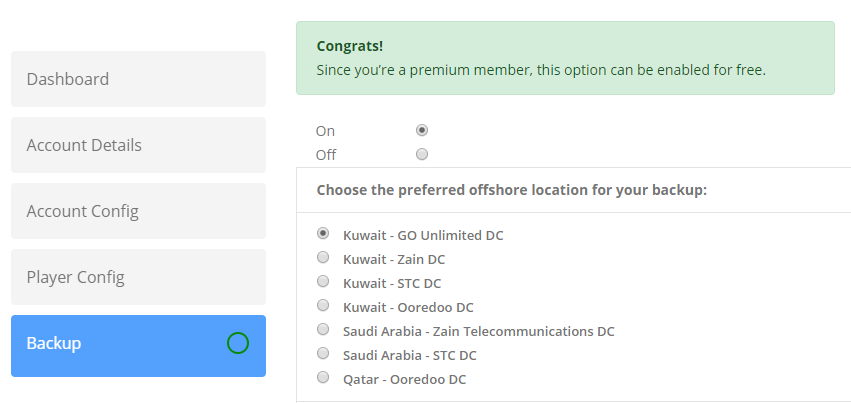
  • A new section on My Account page for your backups.
  • The option gives the user the ability to choose the preferred backup location, including GO Unlimited Data Center in Kuwait, or an external data center if the user have concerns about our resources hardwares.
  • The backup cost $0.015/GB or $14.99/TB, monthly. But if you’re one of the affected users it will show you (You will be charged $0.00/GB, monthly) as we will offer the affected users this option for free, forever.

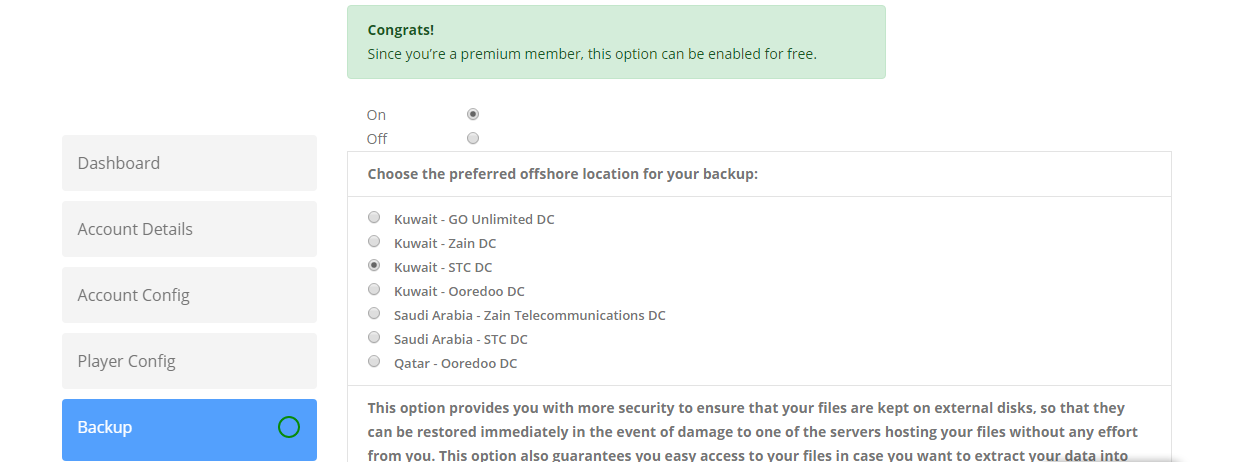
This option provides you with more security to ensure that your files are kept on external disks, so that they can be restored immediately in the event of damage to one of the servers hosting your files without any effort from you. This option also guarantees you easy access to your files in case you want to extract your data into your own machine such as moving into a dedicated server.

When this option is enabled, you will never suffer any financial or logistical losses if one of the servers loaded with your files is damaged.

In addition to additional protection, you will be able to transfer your files from these backups in case your site grows and you want to transfer your files to your own servers. You will be able to obtain login information for your backup copies when requested, and transfer your files through the available means.

This option is not part of the 7 Level of backups that we have set up for the site, and has proven to be a failure, but rather external backup copies stored in centers located under our physical control. But for security reasons, we will not give up the 7 level of backups that we have developed since we already paid for 3 years ahead in any case, and we will keep this facility next to the external backups, which we added today.

Please activate this option as soon as possible, and always make sure that it indicates green as this means that all uploaded files have been backed up. If the color changes to red, this means that there are a number of files that have not been backed up yet. So make sure when you enter the site that it is always indicated in green.

Here is a screenshot of the option:
https://prnt.sc/ryiatp

giphy.gif
 
Okay, it seems early but let's go..
Since some users still have concerns about losing their files, despite my promises not to repeat the matter (but I don’t blame anyone, as it is our mistake), we have decided the following in order to reassure everyone, despite the high and very high cost of this infrastructure:
  • A new section on My Account page for your backups.
  • The option gives the user the ability to choose the preferred backup location, including GO Unlimited Data Center in Kuwait, or an external data center if the user have concerns about our resources hardwares.
  • The backup cost $0.015/GB or $14.99/TB, monthly. But if you’re one of the affected users it will show you (You will be charged $0.00/GB, monthly) as we will offer the affected users this option for free, forever.

This option provides you with more security to ensure that your files are kept on external disks, so that they can be restored immediately in the event of damage to one of the servers hosting your files without any effort from you. This option also guarantees you easy access to your files in case you want to extract your data into your own machine such as moving into a dedicated server.

When this option is enabled, you will never suffer any financial or logistical losses if one of the servers loaded with your files is damaged.

In addition to additional protection, you will be able to transfer your files from these backups in case your site grows and you want to transfer your files to your own servers. You will be able to obtain login information for your backup copies when requested, and transfer your files through the available means.

This option is not part of the 7 Level of backups that we have set up for the site, and has proven to be a failure, but rather external backup copies stored in centers located under our physical control. But for security reasons, we will not give up the 7 level of backups that we have developed since we already paid for 3 years ahead in any case, and we will keep this facility next to the external backups, which we added today.

Please activate this option as soon as possible, and always make sure that it indicates green as this means that all uploaded files have been backed up. If the color changes to red, this means that there are a number of files that have not been backed up yet. So make sure when you enter the site that it is always indicated in green.

Here is a screenshot of the option:
https://prnt.sc/ryiatp

giphy.gif

tenor.gif
a6sSM2c.png
 
Thank you for choosing our DC. Using our DC will cost us less money since we already have the servers and only pay for electricity, cooling, and such things. But with external DC's we pay the rent of the whole servers including their services. But however, we offered external locations for those who prefer them.
 
Okay, it seems early but let's go..
Since some users still have concerns about losing their files, despite my promises not to repeat the matter (but I don’t blame anyone, as it is our mistake), we have decided the following in order to reassure everyone, despite the high and very high cost of this infrastructure:
  • A new section on My Account page for your backups.
  • The option gives the user the ability to choose the preferred backup location, including GO Unlimited Data Center in Kuwait, or an external data center if the user have concerns about our resources hardwares.
  • The backup cost $0.015/GB or $14.99/TB, monthly. But if you’re one of the affected users it will show you (You will be charged $0.00/GB, monthly) as we will offer the affected users this option for free, forever.

This option provides you with more security to ensure that your files are kept on external disks, so that they can be restored immediately in the event of damage to one of the servers hosting your files without any effort from you. This option also guarantees you easy access to your files in case you want to extract your data into your own machine such as moving into a dedicated server.

When this option is enabled, you will never suffer any financial or logistical losses if one of the servers loaded with your files is damaged.

In addition to additional protection, you will be able to transfer your files from these backups in case your site grows and you want to transfer your files to your own servers. You will be able to obtain login information for your backup copies when requested, and transfer your files through the available means.

This option is not part of the 7 Level of backups that we have set up for the site, and has proven to be a failure, but rather external backup copies stored in centers located under our physical control. But for security reasons, we will not give up the 7 level of backups that we have developed since we already paid for 3 years ahead in any case, and we will keep this facility next to the external backups, which we added today.

Please activate this option as soon as possible, and always make sure that it indicates green as this means that all uploaded files have been backed up. If the color changes to red, this means that there are a number of files that have not been backed up yet. So make sure when you enter the site that it is always indicated in green.

Here is a screenshot of the option:
https://prnt.sc/ryiatp

giphy.gif
I love the new feature. :heart_eyes:
which DC do you recommend the most?
 
Status
Not open for further replies.
Back
Top