FileServe - Make Money - Up to $25 per 1000 downloads (Official thread)

Status
Not open for further replies.
@ powerups2: Yes just tested. A bit slower than normal. It did work for the file that I remote uploaded. Just took a bit longer than the usual 5-10 minutes. Will have techs look at it tomorrow.

@ iEncode: Surprised there's one that could actually put themselves in our shoes ..for once! Appreciate it and you got it pretty much spot on.
 
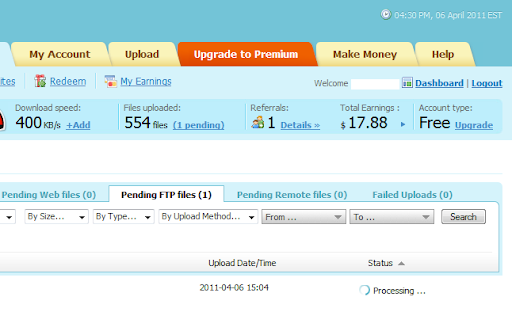
What's going on today with uploading via FTP?
The speeds are very slow, files are pending several hours, and when I want to copy them I get an error...

I'm not so happy with FS at the moment :(
 
Could be a little overload from someone spamming files to the FTP
or
Could be that something broke on our back end
or
Could be something else

Won't know until 5 hours time when it is looked at :)
 
@ iEncode: Surprised there's one that could actually put themselves in our shoes ..for once! Appreciate it and you got it pretty much spot on.

RIGHT !!!!

this is right...

but..
if someone say fileserve page are slow...ricky say it's our isp problem
if ftp is slow....if our problem...we must take a box in usa...
if someone say stats not work...ricky say it's not important...
if someone says file disappear wqithout sense...rickt don't say nothing...and say we talk only to do war with fileserve...

if ricky say
there is big big problem we try to fix in last 5 months and we not able to fix it...but will do...
excuse for the problem/issue etc..etc..
it's another "put themselves in our shoes"

from start to now...ricky only get a stupid war with all that talk about bug and problem

and...there is nothing in fileserve news page about this bug...this is not good
 
@ ciaociao:

-FS' page isn't slow. You had slow logins lately? I haven't.
-FTP speed is capped at 1500 KB/sec. Do you upload with that speed? If so, make multiple connections. You know the drill
-If stats don't work - I've never said it wasn't important. I've said we had bigger issues to solve such as 404 files.
-If a file disappears, there's 2 reasons to it: It was either reported OR it went into the cycle of idled files without download for over 60 days. Do you have any idea what server space costs? Get a clue.

-Last 5 months? What problem? We fixed the file manager count up until March 6th when we implemented an upgrade to the system which we're still doing.

Got anything you want to add with that before you talk in a stream of nonsense, yet again, or will you resolve to "omg lol lol lol" comments like you do in DP? If you will relay to such comments I will report your posts.

You make small issues sound like the world is collapsing. Take a breathe of fresh air where ever you are or stick your face in a mask that gives you pure oxygen. Might freshen up your life a bit more.

Also, instead of badmouthing us from time to time, which you've been doing for the past 5 months, how about you just stop using our service? It is that simple. I don't put a gun to your head forcing you to use us. That's voluntary.
 
@ all: Want to know if you're still getting 404s. Not talking about absolutely fresh links that you uploaded a second ago, but any other links that you've bumped into that have given you 404.

This is in regards to server fsdndm.fileserve.com .... Please report if any issues.

Also if your download has disconnected please get at me so I can test this out too. Thanks


I'm still getting 404s with this files:
http://fileserve.com/file/cpvaDUK
http://fileserve.com/file/jtrg4kN

And with this files I have the "can't connect to server" problem:
http://fileserve.com/file/hSnDQun
http://fileserve.com/file/ZXtecJK
http://fileserve.com/file/5TTjTm4
http://fileserve.com/file/nef7wAT
http://fileserve.com/file/fWGbZpE
http://fileserve.com/file/SqXDWeS
http://fileserve.com/file/Dpcev9z
http://fileserve.com/file/RuAr7xn
http://fileserve.com/file/5wtfGG7
JDownloader says: "Disconnected???" and shows a 5 minutes countdown for a retry.

If I find more files, I'll let you know. I hope you can soon solve this issues once for all.

Thank you for your efforts, Ricky. Cheers. =)
 
Last edited:
@ bradster154: Appreciate it :) Will have them get looked at and hopefully we can bring them up again. Thanks!

@ Cashio: Update,

Just tried to upload a few files via FTP (total 50 MB [sample]). Files went straight over to the File Manager within a minute (30-40 sec. to be precise) of each upload.
 
Last edited:
Why I cant make a copy of a file?

Error is found when copying the file
 
Last edited:
@Ricky:

My files are much larger around 300 MB each. It's possible that each time they reach the server with which there is a problem?
The last file I uploaded about 1.5h ago and is still pending (see pic).
Unfortunately, my earnings are also affected, because my files show up in the net with a long delay.

ftp.png


Ricky, I'm not complaining, I'm happy with your service, or well maybe not today :))
I just wanted to let you know that there is a problem.

@ciaociao: get a life...
 
Last edited:
Hey RickyFS I had a problem with my paypal account (got limited status) and the only way to recover some money is if I refund back one payment to Fileserve and you credit it back to my Fileserve account (or alternatively send it to my other paypal) would that be possible please? :'( it's very important for me, if not I lose this money :'(:'(:'(
 
@ Cashio: Should be back to normal now. Looks like files took 3x the time it should have taken. Fixed now.

@ horde: Earnings didn't creep anywhere. It's actually been GOOD for the past many days. It may have creeped on you, but it may have gained on others.

@ SSK: That can't happen. The only thing we expect from users is to submit a working email. We can't micromanage users.
 
Status
Not open for further replies.
Back
Top