Guest viewing is limited
- You have a limited number of page views remaining
- 8 guest views remaining
- Register now to remove this limitation
- Already a member? Click here to login


You are using an out of date browser. It may not display this or other websites correctly.
You should upgrade or use an alternative browser.
You should upgrade or use an alternative browser.
KatFile.COM - PPS Service
- Thread starter KatFile
- Start date







9,319 comments
Hi, admin. Is that able to extend my premium account? It has already expired..Done all.
My user is: links
Appreciated & thanks a lot !
winson9998
Active Member
Check again.
Status: Delaying connection for 5 seconds due to previously failed connection attempt...
Status: Resolving address of ftp.katfile.com
FTP and FileUploader can't upload again.
Please fix.
Status: Delaying connection for 5 seconds due to previously failed connection attempt...
Status: Resolving address of ftp.katfile.com
FTP and FileUploader can't upload again.
Please fix.
Status: Delaying connection for 5 seconds due to previously failed connection attempt...
Status: Resolving address of ftp.katfile.com
FTP and FileUploader can't upload again.
Please fix.
z_o_o_m´s File & Image Uploader doesn't work. The error message is Send(1) (SocketError:Socket Error # 10061/Connection refused.) (katfile.com).
@KatFile Please let me know if you will fix it, or I should ask the author to investigate the issue and fix it.
@KatFile since FTP upload has not been consistent recently is remote upload viable?
If so, how do I use it?
Fixed check again.FTP doest work
Fixed check again.
No, z_o_o_m´s File & Image Uploader still doesn't work.
tested, working fine . send me screenshot from FTP error.No, z_o_o_m´s File & Image Uploader still doesn't work.
I said z_o_o_m´s File & Image Uploader, not FTP. Here is the screenshot.tested, working fine . send me screenshot from FTP error.
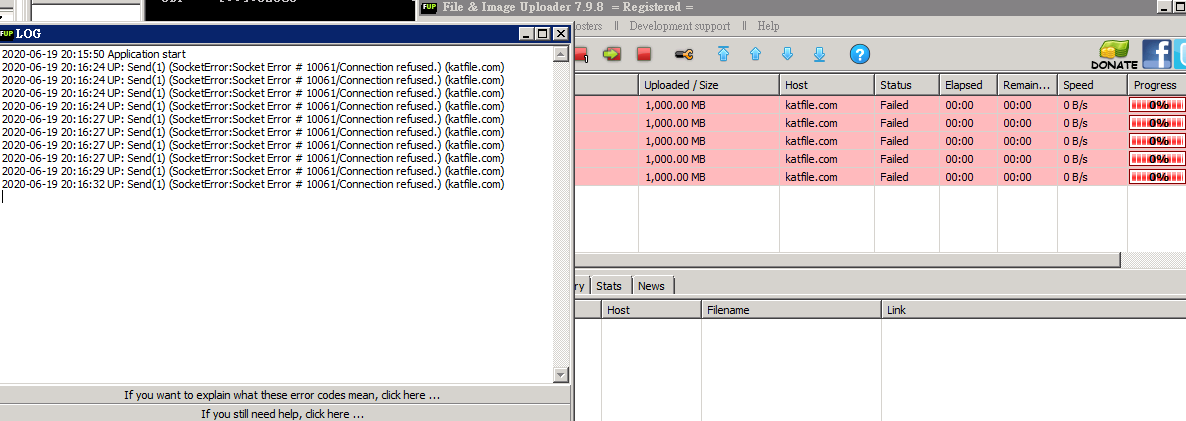
Maybe it uses the API upload method. I guess.
change your ip and try again.I said z_o_o_m´s File & Image Uploader, not FTP. Here is the screenshot.
Maybe it uses the API upload method. I guess.
I cannot change my IP addresses. They are static IP addresses allocated by the datacenter of my servers, LeaseWeb and WorldStream.change your ip and try again.
check againI cannot change my IP addresses. They are static IP addresses allocated by the datacenter of my servers, LeaseWeb and WorldStream.
No, it still doesn't work. I also tried to use my home computer to upload files via the software; however, it doesn't work. It indicates the issue is not related to IP addresses.check again
Did you make any changes regarding to API upload? I saw a new field in My Account page:

The software still use username & password to access KatFile. Should I ask the author to modify his software to use the generated API token?
Last edited:
No idea, because we checked few times and working fine here.No, it still doesn't work. I also tried to use my home computer to upload files via the software; however, it doesn't work. It indicates the issue is not related to IP addresses.
Did you make any changes regarding to API upload? I saw a new field in My Account page:
The software still use username & password to access KatFile. Should I ask the author to modify his software to use the generated API token?
Well, I've contacted the author. Let's see if he can help me. Just hope it's not caused by CloudFlare.No idea, because we checked few times and working fine here.
Web upload works but it's unwise to use the method to upload 238 files.
Last edited: