

So you are hosting wordpress blog on VPS, and there were some server/wordpress updates, or similar disasters that caused your wordpress options tables to crash?
You are getting message: Error establishing a database connection ?
You don't have a backup, and hosting staff is incompetent, and asking from you database backup to restore it?
You tried PHPMyAdmin to repair tables, but it doesn't work? You get some dumb 'blob' messages from phpmyadmin?
You are pulling your hair out? Being bold is not trendy but here's the solution:
=========================
Well, solution is quite simple, but took me plenty of time to find working solution.
Solution is applied through SSH, since repairing tables from phpmyadmin in this case didn't work.
first you need to stop mysqld service by typing:
then run this command (ofc if you are running centos)
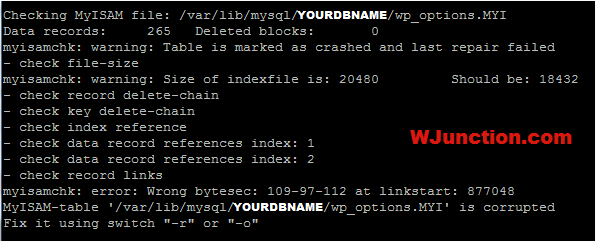
Search through output, and find something like this:
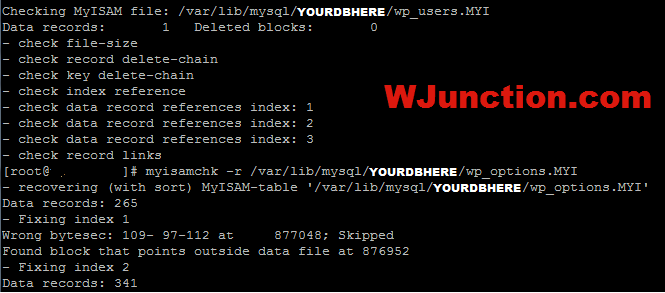
Then run this command:
and last, but not least start mysqld:
Then check your site, it should load now.
You can copy this article, but you must link back to original source.
You are getting message: Error establishing a database connection ?
You don't have a backup, and hosting staff is incompetent, and asking from you database backup to restore it?
You tried PHPMyAdmin to repair tables, but it doesn't work? You get some dumb 'blob' messages from phpmyadmin?
You are pulling your hair out? Being bold is not trendy but here's the solution:
=========================
Well, solution is quite simple, but took me plenty of time to find working solution.
Solution is applied through SSH, since repairing tables from phpmyadmin in this case didn't work.
first you need to stop mysqld service by typing:
Code:
service mysqld stopthen run this command (ofc if you are running centos)
Code:
myisamchk /var/lib/mysql/YOURDBNAME/*.MYISearch through output, and find something like this:
Then run this command:
Code:
myisamchk -r /var/lib/mysql/YOURDBHERE/wp_options.MYIand last, but not least start mysqld:
Code:
service mysqld startThen check your site, it should load now.
You can copy this article, but you must link back to original source.


