




For a long time, Exact Match in Google Ads was the gold standard for media buyers who wanted total control over their campaigns. The logic was simple: wrap your keyword in brackets, load up your negative keyword lists, and expect traffic only from the exact phrases you specified. But in 2026, the tech giant has quietly rewritten the rules behind the scenes.
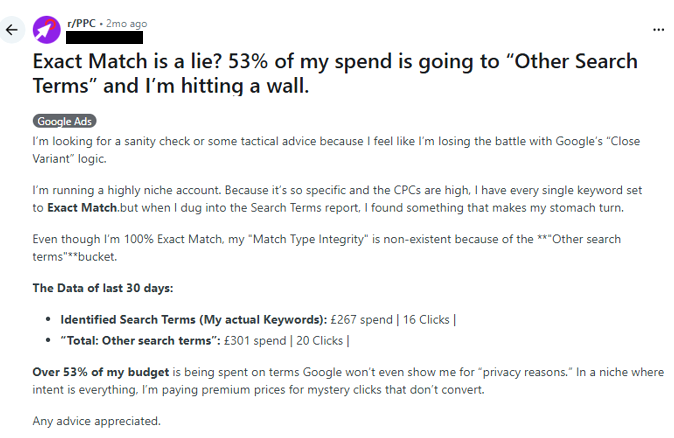
A recent thread on Reddit perfectly highlighted the current state of affairs: A user ran all their keywords in Exact Match. Over 30 days, £267 went to the specified search terms, resulting in 16 clicks. However, "close variants" — which Google doesn't fully disclose in the dashboard — gobbled up another £301 for 20 clicks. With a total spend of £568, it’s easy to see that about 53% of the budget went toward traffic the affiliate never actually wanted.
Let’s break down what has changed in Google Ads and how to adapt your strategy so you stop throwing money away.
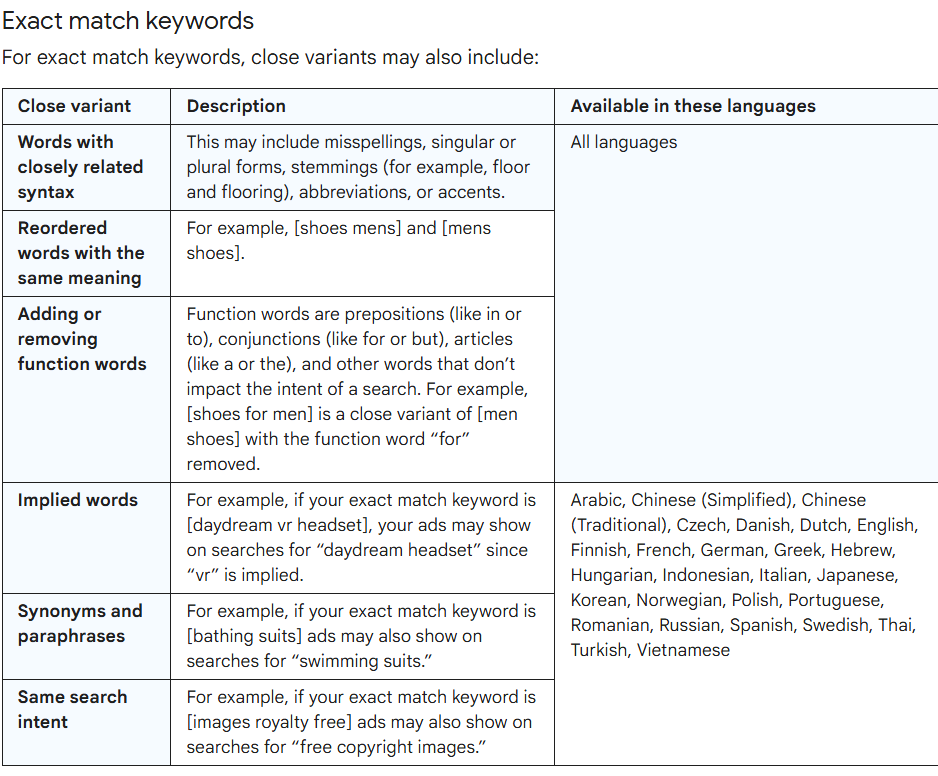
Previously, if you added [buy business insurance], you could expect traffic strictly for that phrase or very close variants. Today, those brackets are more of a "signal" to the algorithm than a hard constraint. Google’s platform has shifted its focus to user intent rather than syntax.
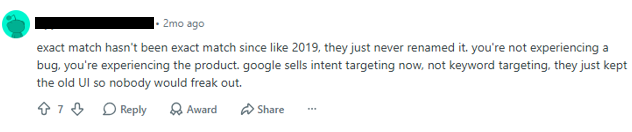
From Google’s perspective, this makes sense. People search for the same thing using different words, typos, word order changes, or incomplete queries. The algorithm tries to capture the underlying intent, not the literal match.
The Problem: In business, similar intent does not always mean similar value. One query might be high-intent (commercial), while another is purely informational (someone looking for a promo code, a bonus, or a review). To an affiliate, these are two different audiences with different conversion rates and CPCs. To Google, they are all in the same "semantic field."
The result? Media buyers think they are controlling traffic through Exact Match, when in reality, they are only controlling the "input signal." Google decides which "close variants" are relevant, and hides the rest under "Other search terms."
It simply gives Google a narrower entry point, and then the algorithm will inevitably try to expand your reach.
To find the right keywords, you’ll end up needing to run dozens of campaigns simultaneously, constantly updating negative lists, cleaning up queries, and sometimes rebuilding your structure from scratch. On "fresh" or untrusted accounts, this level of activity is a fast track to a policy review or a ban before you even reach stable ROI.
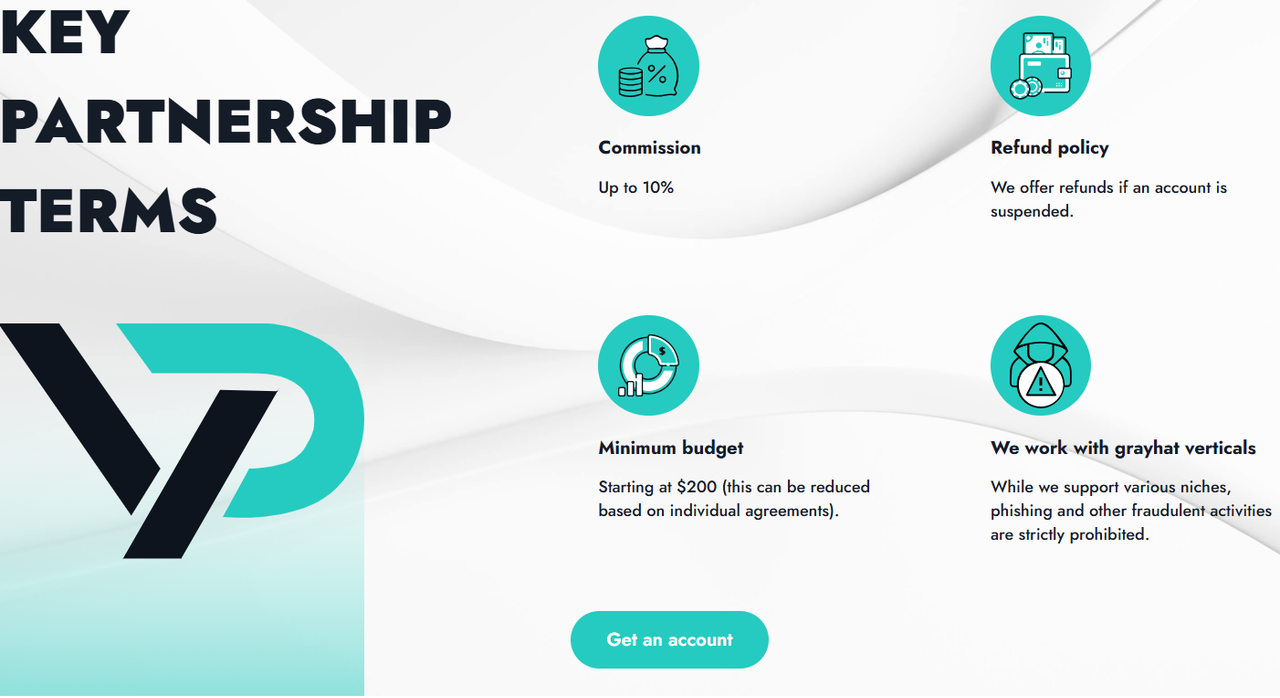
Pro-Tip: In 2026, experienced affiliates recommend running Google Ads via trusted agency accounts. These are built to handle the rigorous optimization that Google expects. For example, YeezyPay provides pre-verified agency accounts with history, which are perfect for even gray hat verticals. This lets you adapt to Google’s whims quickly without risking your budget or your funnel.
Reality check: Google doesn't view this as a bug; it views it as "proper functioning" of close variants. You won't get a refund for "wrong" traffic.


You need to be aggressive with your negative lists. If you are running a crypto offer, it is not enough to just block the word "free." You need to block:
Note on Financial Safety: Hoping that Google will eventually refund you for these "close variant" clicks is a losing strategy. It is much safer to work with a system where your budget isn't trapped in a single account. Unlike personal accounts where a refund is impossible, or shady agency providers who will keep your funds, YeezyPay offers financial flexibility: you can top up via USDT, track expenses within the dashboard, and, crucially, withdraw your remaining balance if an account gets banned. In the current climate of "Exact Match" unpredictability, this is a lifesaver. You don't want your budget frozen—you want it ready for your next winning hypothesis.


Trying to trick the system isn't sustainable. The only way to win is through rigorous segmentation and proper infrastructure. On weak, personal accounts, this level of constant optimization is a one-way ticket to a suspension. Using trusted agency accounts — like those from YeezyPay, which has already issued over 40,000 accounts and managed over $50M in spend — gives you the stability to iterate, test new funnels, and maintain control over your budget when things inevitably shift.
A recent thread on Reddit perfectly highlighted the current state of affairs: A user ran all their keywords in Exact Match. Over 30 days, £267 went to the specified search terms, resulting in 16 clicks. However, "close variants" — which Google doesn't fully disclose in the dashboard — gobbled up another £301 for 20 clicks. With a total spend of £568, it’s easy to see that about 53% of the budget went toward traffic the affiliate never actually wanted.
Let’s break down what has changed in Google Ads and how to adapt your strategy so you stop throwing money away.
Why "Exact Match" is No Longer Exact
The first thing to accept is this: Exact Match no longer guarantees traffic only for your exact phrasing.Previously, if you added [buy business insurance], you could expect traffic strictly for that phrase or very close variants. Today, those brackets are more of a "signal" to the algorithm than a hard constraint. Google’s platform has shifted its focus to user intent rather than syntax.
From Google’s perspective, this makes sense. People search for the same thing using different words, typos, word order changes, or incomplete queries. The algorithm tries to capture the underlying intent, not the literal match.
The Problem: In business, similar intent does not always mean similar value. One query might be high-intent (commercial), while another is purely informational (someone looking for a promo code, a bonus, or a review). To an affiliate, these are two different audiences with different conversion rates and CPCs. To Google, they are all in the same "semantic field."
The "Other Search Terms" Black Box
Google’s Search Terms report is also misleading. While Google claims it shows you the real queries that triggered your ads, it hides a massive chunk of data under privacy policies — specifically queries with low volume.The result? Media buyers think they are controlling traffic through Exact Match, when in reality, they are only controlling the "input signal." Google decides which "close variants" are relevant, and hides the rest under "Other search terms."
Why You Can’t Rely on Exact Match for Quality Control
Exact Match is a useful tool, but it is not a standalone safety net. If your campaign structure is weak, your negative keyword lists are shallow, and your bidding is left to automation without proper data, Exact Match won't save you.It simply gives Google a narrower entry point, and then the algorithm will inevitably try to expand your reach.
To find the right keywords, you’ll end up needing to run dozens of campaigns simultaneously, constantly updating negative lists, cleaning up queries, and sometimes rebuilding your structure from scratch. On "fresh" or untrusted accounts, this level of activity is a fast track to a policy review or a ban before you even reach stable ROI.
Pro-Tip: In 2026, experienced affiliates recommend running Google Ads via trusted agency accounts. These are built to handle the rigorous optimization that Google expects. For example, YeezyPay provides pre-verified agency accounts with history, which are perfect for even gray hat verticals. This lets you adapt to Google’s whims quickly without risking your budget or your funnel.
What Does NOT Work
1. Fighting Support or "Reporting" the Issue
Some users on Reddit suggest contacting Google Support, adding all irrelevant search terms to negatives, and complaining about the algorithm.Reality check: Google doesn't view this as a bug; it views it as "proper functioning" of close variants. You won't get a refund for "wrong" traffic.
2. Duplicating Campaigns
Some think creating multiple narrow campaigns will force Google to be more precise. In reality, if your campaigns overlap in keywords, GEO, or audience, you don't get control — you get internal cannibalization.3. Relying on Single-Word Negatives
Google’s logic for negative keywords is literal, not semantic. If you add "free" as a negative, you won't block "free of charge" or "no-cost."
You need to be aggressive with your negative lists. If you are running a crypto offer, it is not enough to just block the word "free." You need to block:
- "What is cryptocurrency" / "What is Bitcoin"
- "How does crypto work"
- "How to mine" / "Mining"
- "Trading courses" / "Trading books"
- "Crypto forum" / "Scam" / "Fraud" / "Complaints"
4. Blindly Trusting Auto-Strategies
If your campaign already contains junk close variants, overlaps, and a huge portion of "Other search terms," your auto-strategies are learning on trash data. The system will optimize for the "reality" you gave it. If that reality is filled with irrelevant traffic, your budget will effectively fund the algorithm's mistake.Note on Financial Safety: Hoping that Google will eventually refund you for these "close variant" clicks is a losing strategy. It is much safer to work with a system where your budget isn't trapped in a single account. Unlike personal accounts where a refund is impossible, or shady agency providers who will keep your funds, YeezyPay offers financial flexibility: you can top up via USDT, track expenses within the dashboard, and, crucially, withdraw your remaining balance if an account gets banned. In the current climate of "Exact Match" unpredictability, this is a lifesaver. You don't want your budget frozen—you want it ready for your next winning hypothesis.
How to Actually Protect Your Budget
Since you cannot force Google to disable "Close Variants," you must structure your campaigns so the algorithm has fewer opportunities to bleed your budget.1. Split Campaigns by Intent
Don't mix intents. If you are promoting "Casino N," use separate campaigns:- Branded Campaign: [register at Casino N], [deposit at Casino N], [slots at Casino N].
- General/Generic Campaign: [create casino account], [best online casinos], etc.
2. Multi-Level Negative Keywords
- Account-level: For universal trash (e.g., "free," "no deposit," "prediction").
- Campaign-level: Exclude intents that disrupt specific campaigns (e.g., exclude competitor names from your brand campaign).
- Ad Group-level: Separate "Hot" intent ([casino registration], [play casino for money]) from "Bonus" intent ([casino bonus], [free spins]).
3. Analyze the "Other"
Pay close attention to the Search Terms report. If a significant percentage of your spend is ending up in "Other search terms," do not increase the budget. Instead, perform a deep dive: reorganize your structure, tighten your negatives, and lower your bids.4. Manual Bidding at the Start
When starting, manual CPC gives you more control. Automated strategies need high-quality data to learn. If you start with manual bidding, you define the risk, and you can transition to automated strategies only once the campaign has a stable, "clean" history.Final Thoughts
In 2026, "Exact Match" is a guide, not a wall. If your budget is leaking into "Other search terms," it’s not always a bug — it’s just how Google Ads works now.Trying to trick the system isn't sustainable. The only way to win is through rigorous segmentation and proper infrastructure. On weak, personal accounts, this level of constant optimization is a one-way ticket to a suspension. Using trusted agency accounts — like those from YeezyPay, which has already issued over 40,000 accounts and managed over $50M in spend — gives you the stability to iterate, test new funnels, and maintain control over your budget when things inevitably shift.


