Dolphin{anty} — a modern antidetect browser - 10 free profiles for everyone

Dolphin Team

Active Member
32
2023
0
780
We present to your attention a modern antidetect browser - Dolphin{anty}⚡

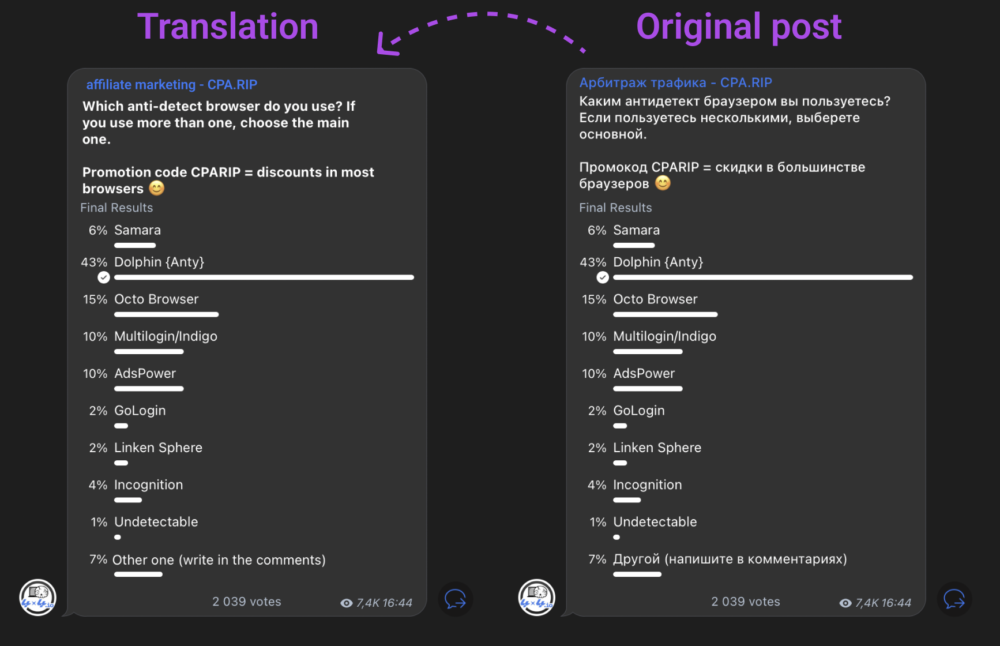
❗Reliability and convenience are the main postulates of the developers. That's why we won the market leadership in less than a year after the release. The user survey clearly demonstrates this!
cleanshot_2022-08-17_at_14.27.38_2x-e1660894513890.png

Reliability
- continuous improvement in the quality of the browser fingerprint replacement and the stability of the product's servers. The last thing the user should doubt is the quality of the tool. For us, this is a top priority.

Convenience - working with hundreds and thousands of browser profiles is a big problem. A necessary development vector is the creation of additional functionality that will further simplify the user's work in the daily rhythm, both in single mode and in a team.

Works great with: — Facebook , — Instagram , — Google, — Discord, — YouTube, — Twitter, — TikTok, — Coinlist, — Huobi, — Amazon, — eBay, — bet365 etc.
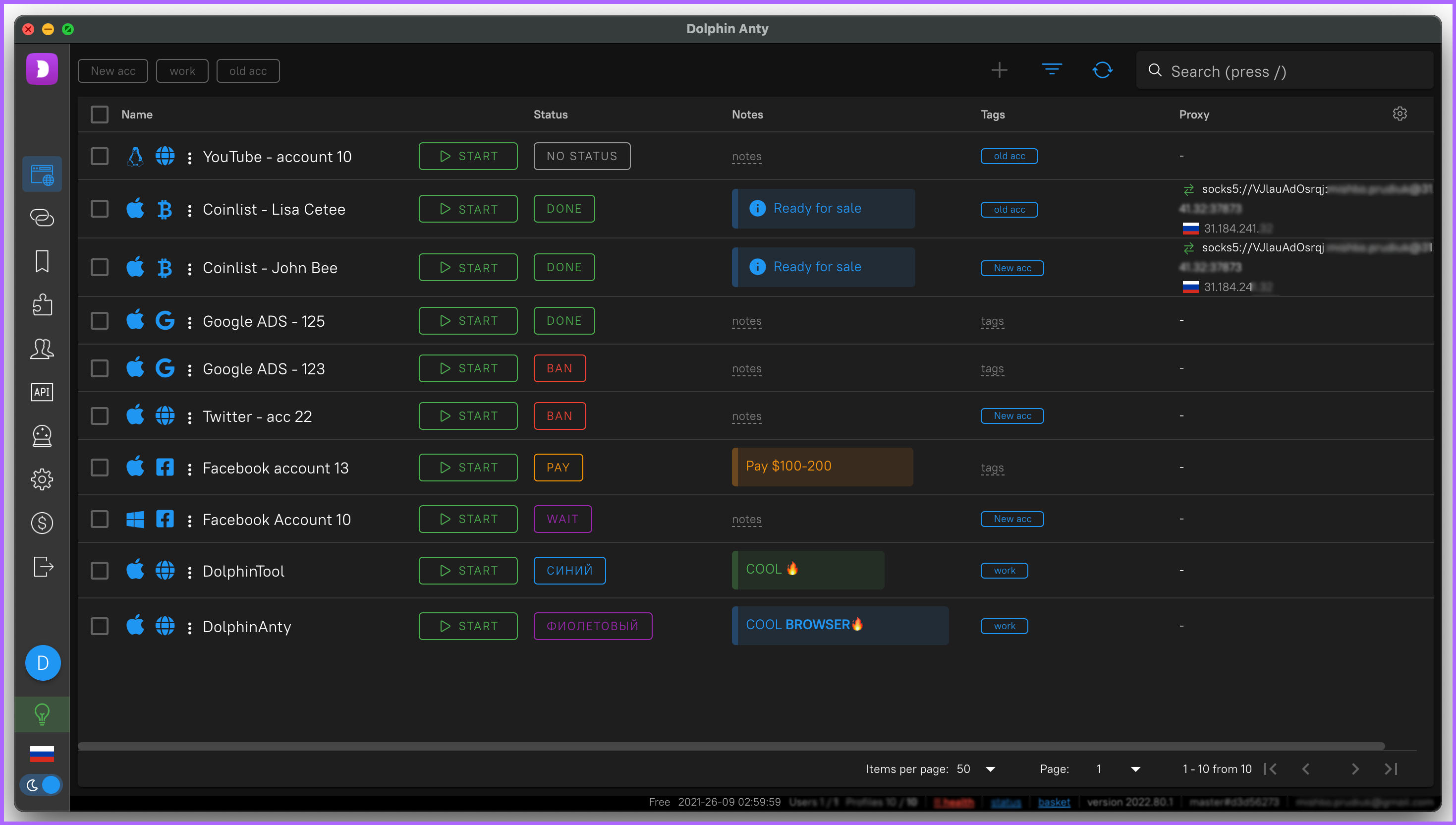


• By using Dolphin{anty} you will notice the following benefits:

✅ Manage browser profiles

Work with hundreds of profiles from one device. Each profile is a unique browser fingerprint with a separate web environment. Cache, cookies and other settings are completely separated from each other, which does not allow them to be associated with other accounts.
Profile-Management-e1660050973434.png

✅ Real browser fingerprint based on our personal browser build
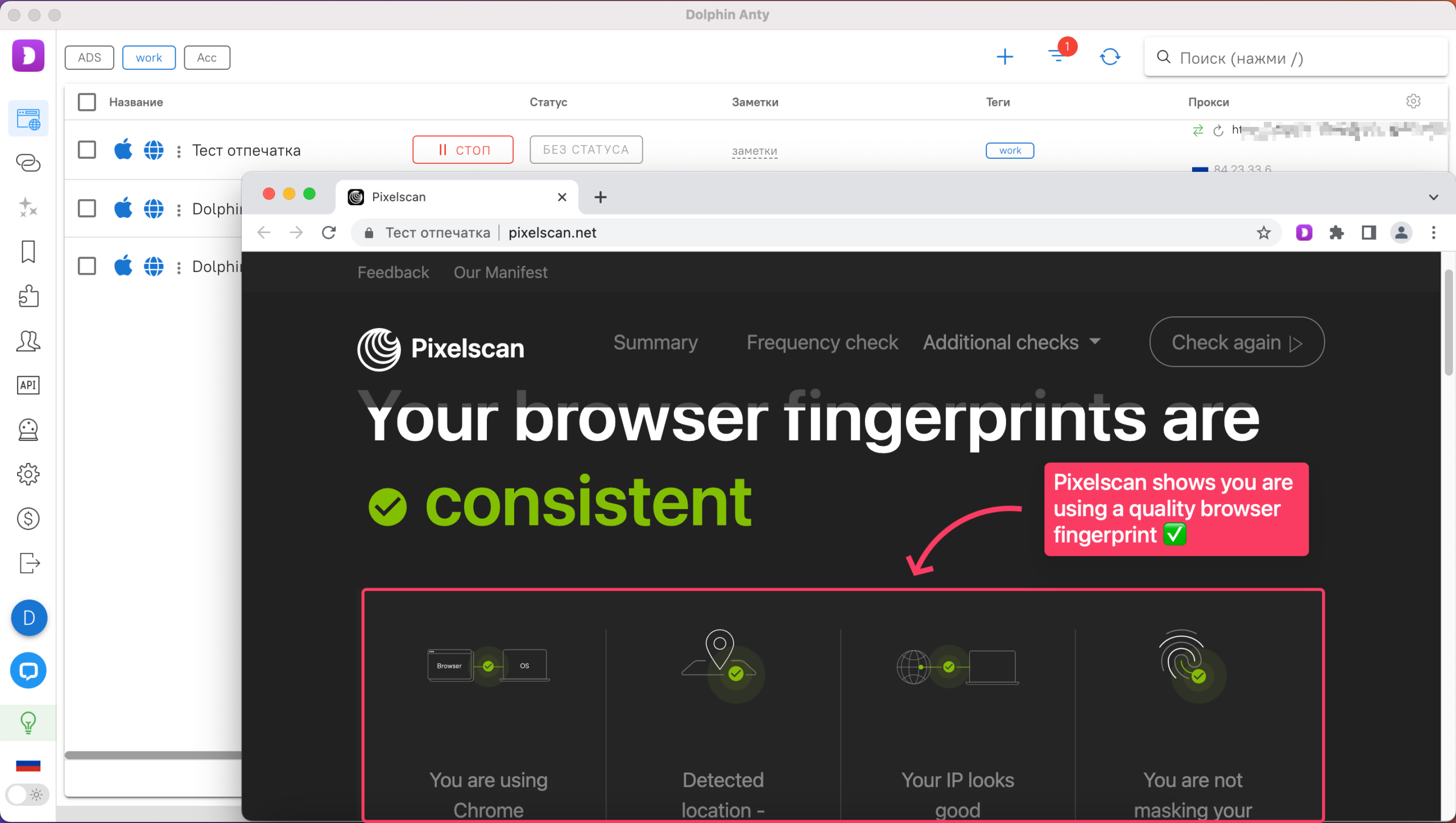
We have not just created a mechanism for generating different fingerprints, but have developed a system that takes real fingerprints from users and provides them to users. Thus, using our browser, you will be as "similar" to a normal Internet user as possible. We constantly put a lot of effort into ensuring that they are checked by any scanners, including pixelscan, creepJS and others.
Real-browser-fingerprint-e1660051109828.png

✅ Teamwork
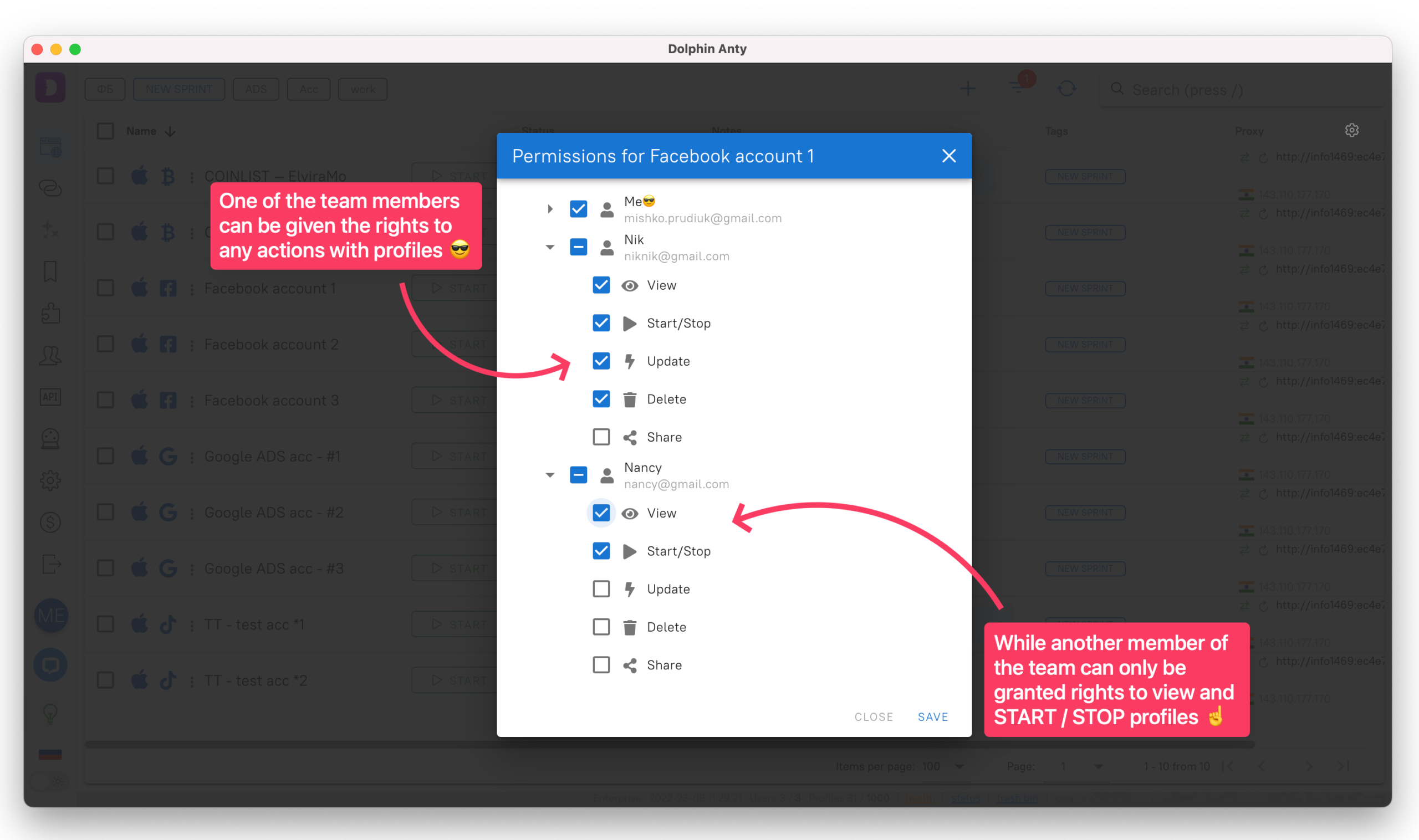
A modern anti-detect browser requires not only a high-quality replacement for a fingerprint, but also convenient collaboration with other users. Dolphin{anty} provides the ability to issue individual access rights and monitor the status of profiles of each team member.
Team-management-e1660051241442.png

✅ Notes, tags and statuses
Simplicity and ease of use of the browser is one of the highest priority items. Quickly create a note, pin a tag, or set a status for each profile to create the most intuitive work environment. You can find the same profile out of a thousand and find out what data is inside it in a couple of clicks.
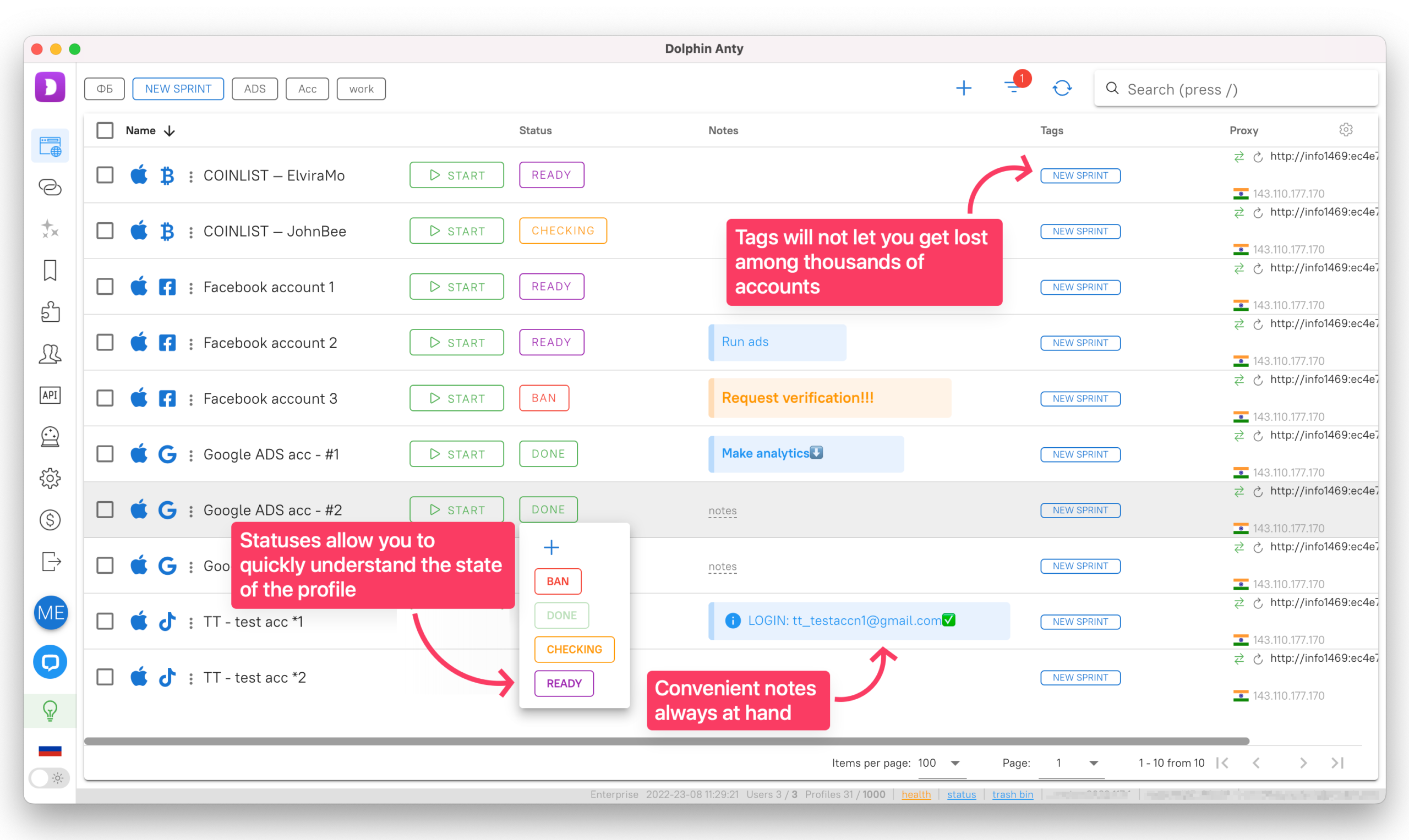
Notes-and-statuses-e1660051339686.png

✅ Mass creation and management
To work effectively with a large amount of data, you just need the functionality for mass creation and management. Of course, we paid attention to this and made it possible to create, manage, apply and massively remove browser profiles, proxies and extensions in a few clicks.
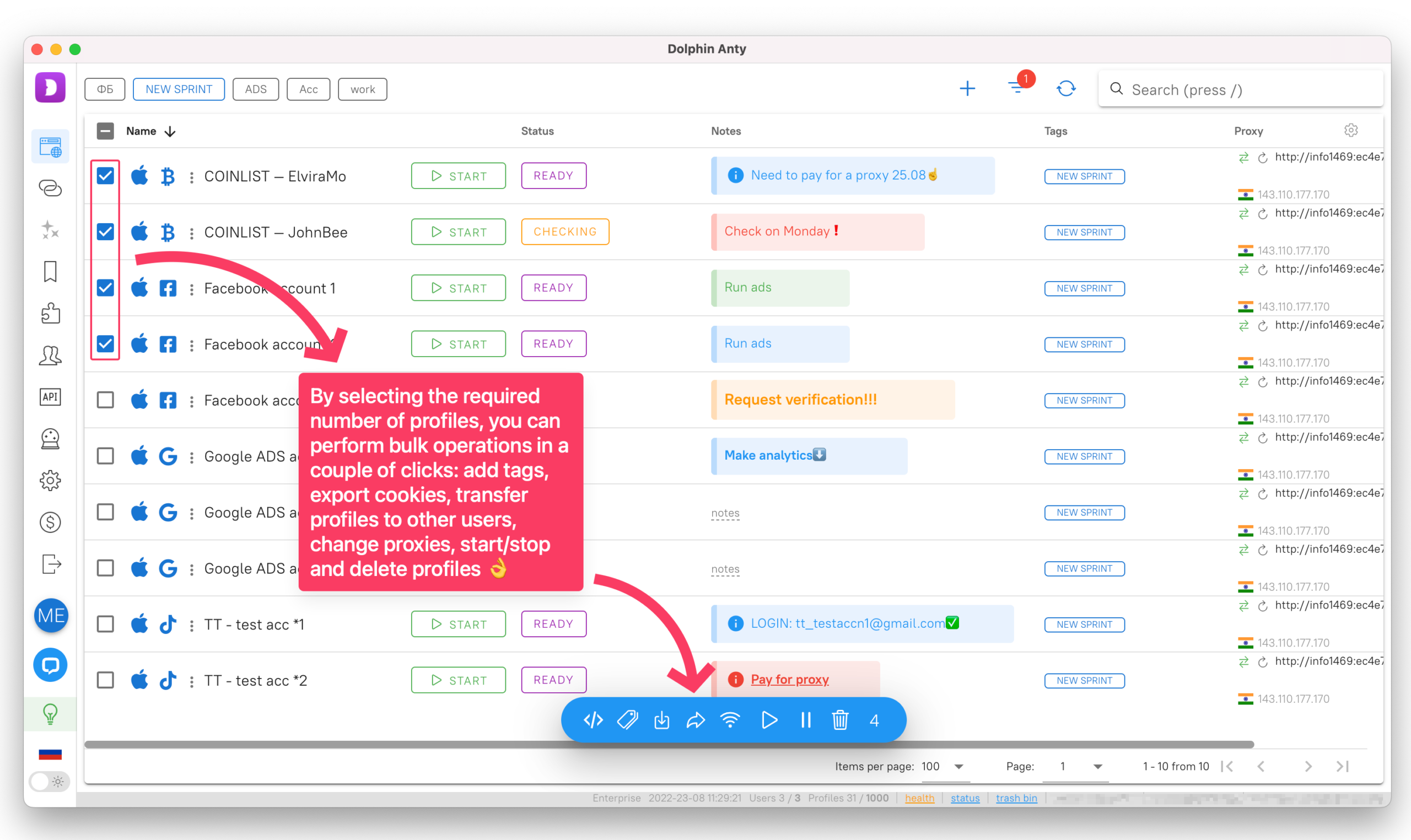
mass-control-e1660051441574.png
Our benefits don't end there. More information can be found in our blog ;)

❗️Dear users, we also did not forget about such important features as:
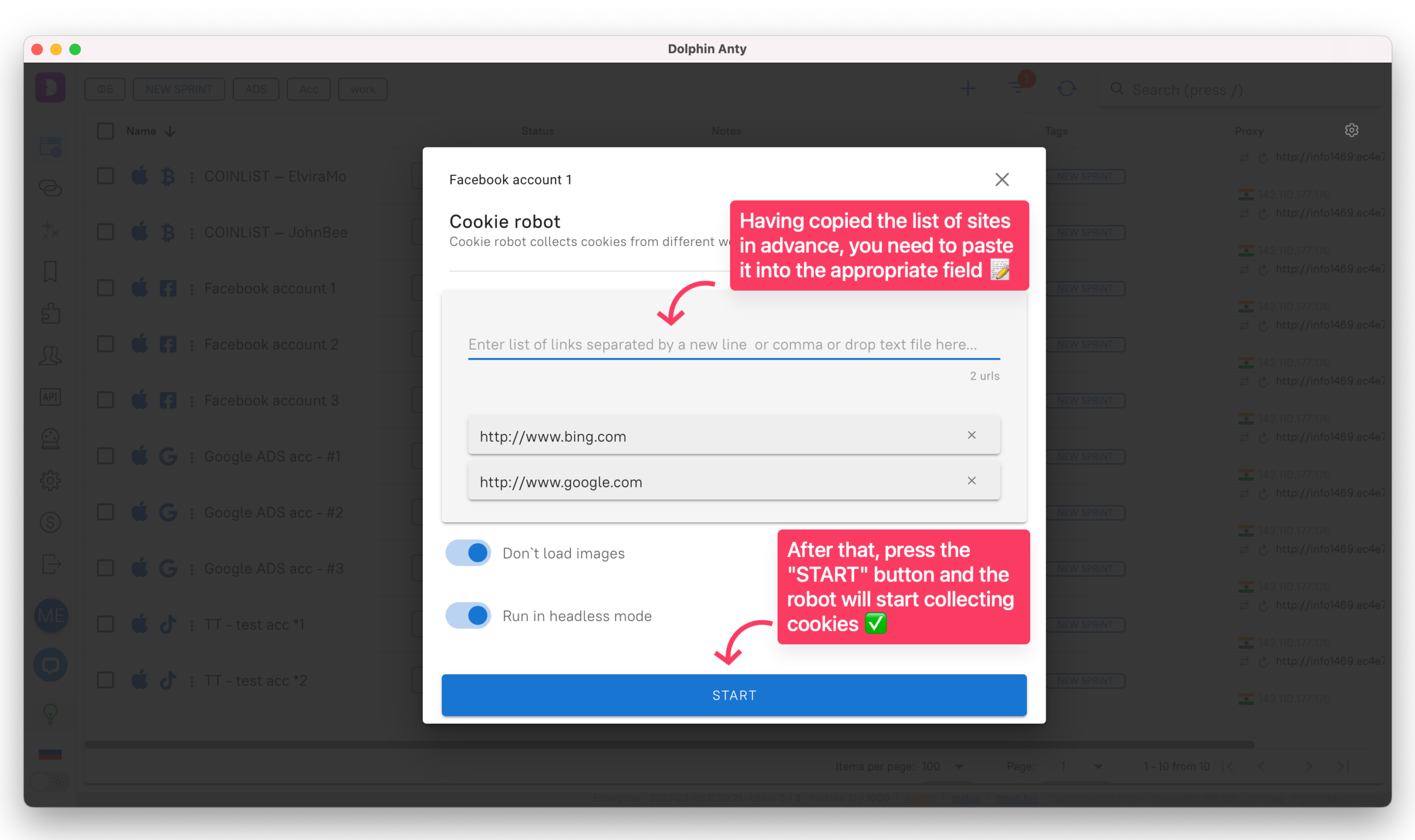
⚡ cookie robot,
⚡ work via API,
⚡ Selenium/Puppeteer automation,
⚡ human input/SmartPaste function,
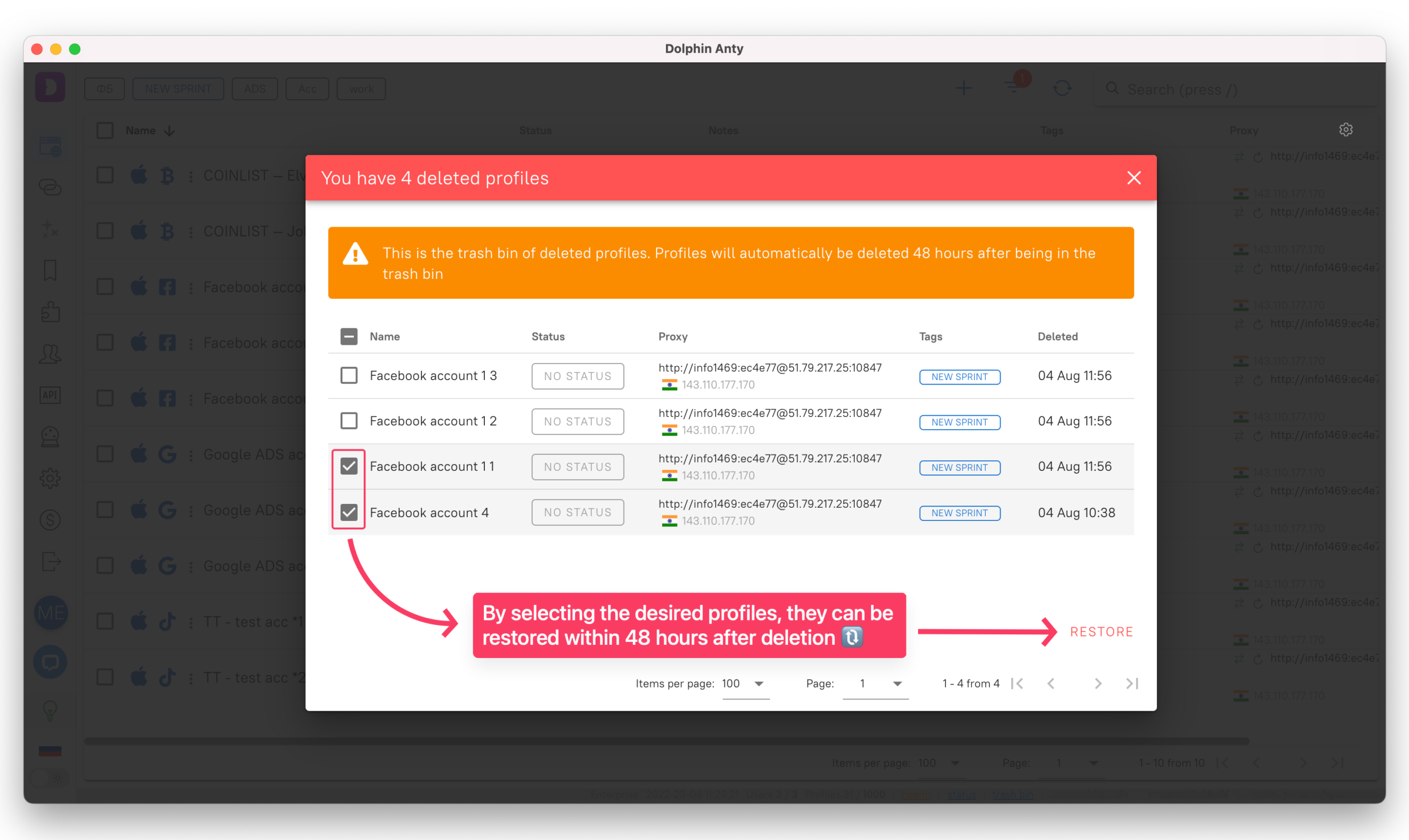
⚡ trash of deleted profiles,
⚡ transferring profiles to another user,
⚡ dark or light theme,
⚡ change proxy IP in one click
- all this is already implemented and available for use!
In addition, we constantly update the current version of the core in accordance with the releases of the Chrome browser.
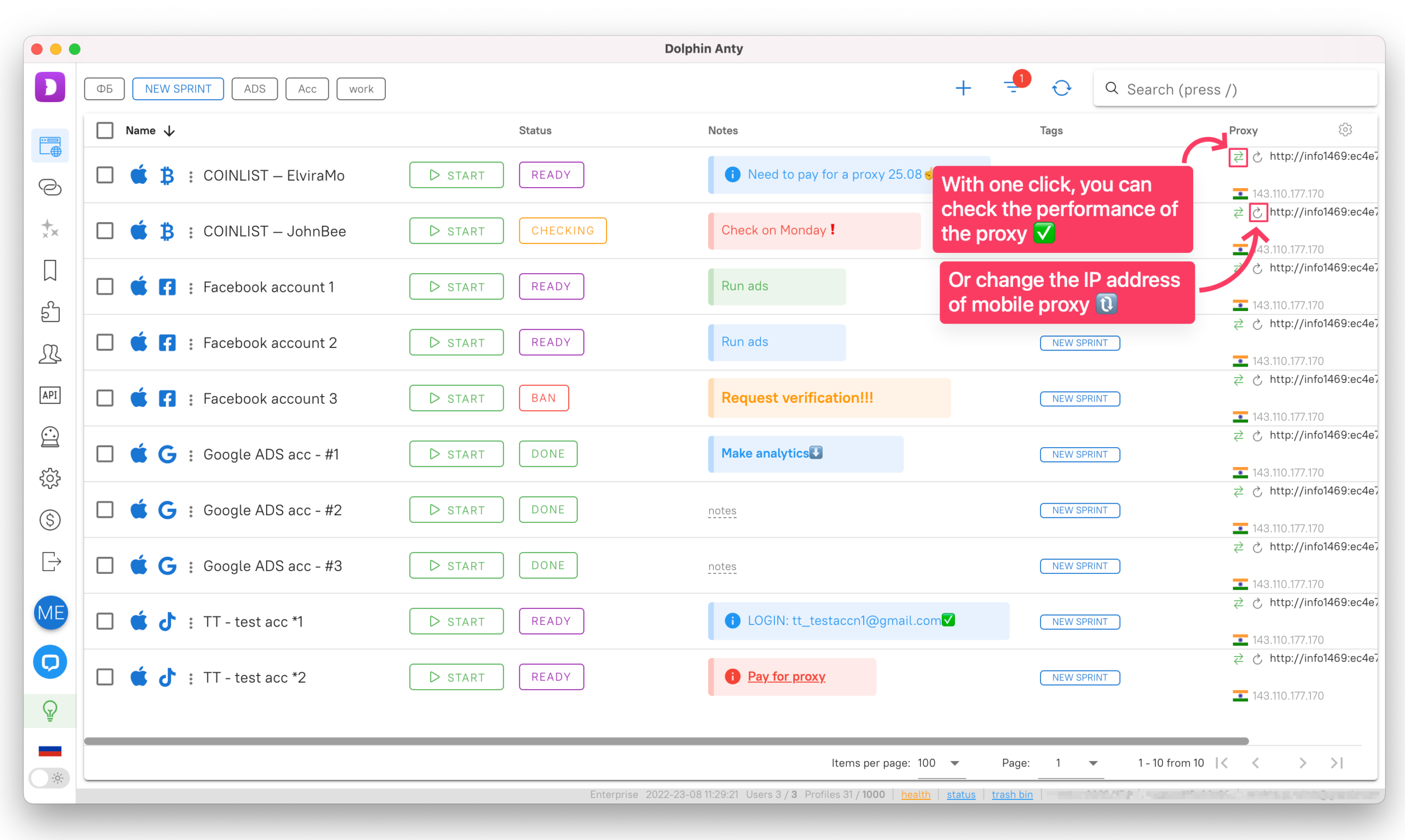
IP-change-e1660051661484.png

cookie-robot-e1660051718294.png

profile-basket-e1660051773774.png

light-black-theme-e1660051895283.png

In the modern world, an anti-detect browser should be a tool from the category “available to everyone”,
which is why we tried to make very flexible tariff plans with the most affordable prices for all users!

❗After registration, a 4-day trial period for 1000 profiles without functional restrictions will be automatically activated for you.
After this time, you will be able to use 10 profiles or buy any plan.


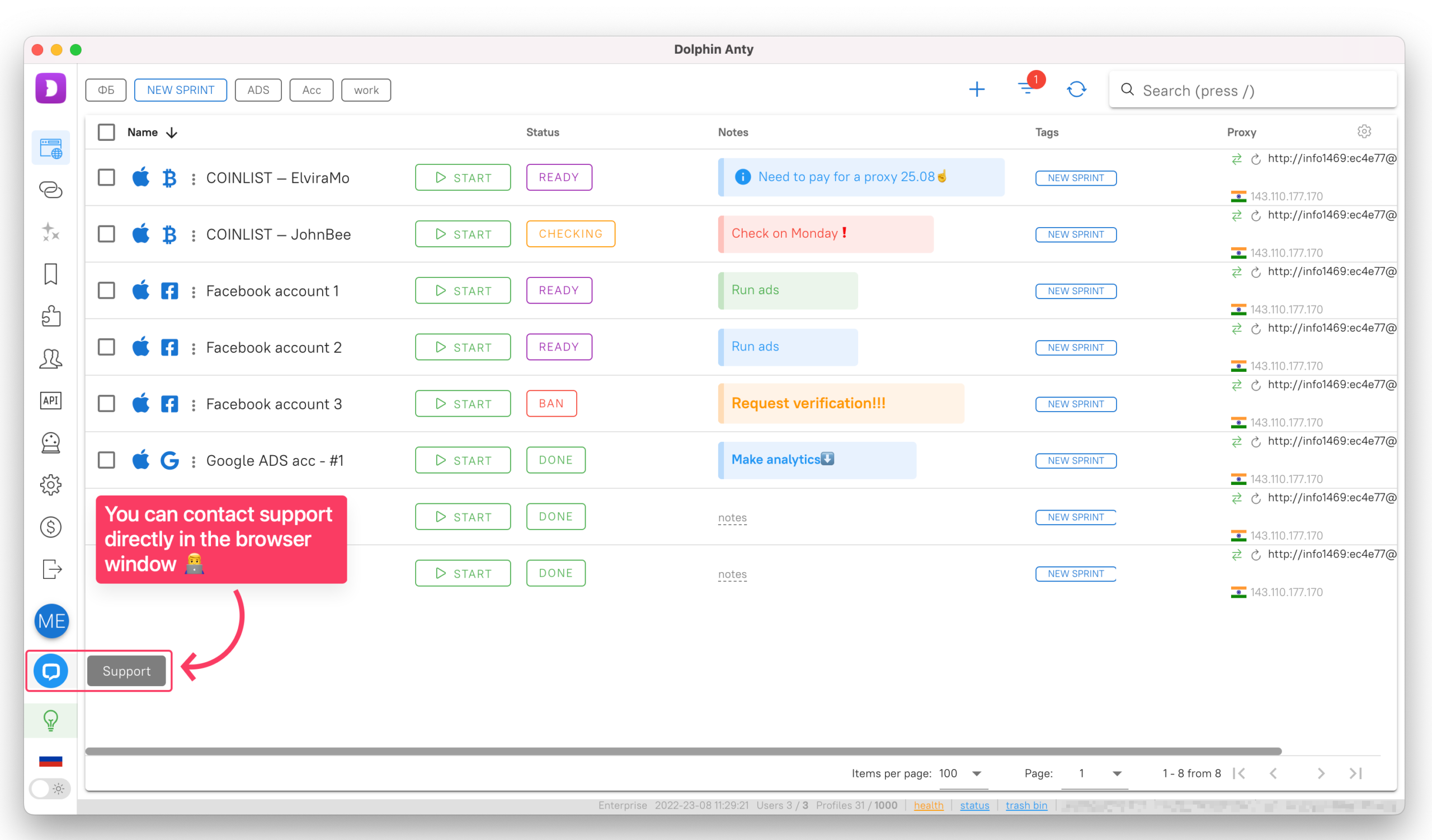
❗Do we have an affiliate program and support service?
You will receive 15% of all payments of the users you referred for life! If you have a proposal for cooperation or you need your own promotional code, please contact support, we will help you with any questions, including the withdrawal of referral funds.
affiliate-program-and-support-e1660050925315.png


⚡️Register an account, download the browser and find out more information from official sources:


Sincerely,
Dolphin{anty} team!
Post automatically merged:

Hi dear friends!
It's Friday and we congratulate you. We wish you a pleasant and fun weekend :)

⬇️ We remind you that you can use the WJ20 coupon to get a 20% discount on the first payment of any Dolphin{anty} plan ⬇️

Promokod-Carbon.png
 
Last edited:
33 comments
🌏 Chromium 1‑3‑6
📆 Release Date: 05/06/2025

The latest core version comes with a range of improvements —
here’s a quick rundown, top to bottom:

— Fixed Chromedriver to ensure scripts run smoothly

— Updated the Chrome icon for Windows in spoofing mode:
it switches to the native icon and looks much sharper,
in every sense of the word 🙂

— Enhanced Canvas Noise

— Streamlined the way onboarding pages for extensions open
➡️ Onboarding pages will no longer open automatically when launching
a profile for the first time, regardless of how the profile was added
(via sharing, import, or collaborative use).

— Browser performance improvements
➡️ We boosted overall performance with several optimizations and
faster JS execution thanks to the latest V8 upgrades. Pages load quicker,
render more smoothly, and feel more responsive when scrolling.

Don’t forget to restart🐬Dolphin{anty} and update to the latest core version!

P.S. Thinking “Why update if everything’s already working?”
Here are three good reasons: stable compatibility with any site,
reliable anti-fraud bypass, and a faster browser experience
😉

EN-e1746683259360.jpg
 
Weekly Updates
Release Date:
May 22, 2025

🔄 Switching Between Accounts

Many users have requested a quick and easy way to switch
between accounts
— for example, between work and personal profiles,
or between different team accounts. Constantly typing in login details,
remembering passwords, or searching for them elsewhere is inconvenient.

➡️ That’s why we’ve added a feature that lets you save your logins and
switch accounts instantly, similar to how Telegram handles it.

Key details:

❌ Not available on the “Free” and “Free+” plans
✅ “Base” plan allows connecting 2 additional accounts
✅ “Team” plan allows up to 3 additional accounts
✅ “Enterprise” plan allows up to 10 additional accounts

🔐 Password Protection for Profiles

We often hear from users who want an extra layer of security
for their browser profiles
— especially when devices are
shared with team members or others.

➡️ Based on this feedback, we’ve introduced the option
to set a password on your browser profile.

P.S. Password reset is only possible if you know the current password.
This feature is available starting from the “Free+” plan.


EN-2-e1748083311629.jpg

Post automatically merged:

🏆 Dolphin{anty} — Voted Best Anti-Detect Browser at the MAC Awards 2025

We’re not big on loud statements. But when users choose you as the best,
it means one thing: we’re heading in the right direction.

🥇 This recognition isn’t just another trophy on the shelf — it’s about trust.
And with trust comes responsibility. That’s why we’ll keep evolving the product:
fast, precisely, and always with a focus on what truly matters to you.

Thank you to everyone who chooses 💜 Dolphin{anty} for your work —
who shares feedback, reports bugs, suggests ideas, and helps us
get better every day. We couldn’t have done it without you!

EN-3-e1748088489409.jpg
 
Last edited:
🔒 Profile Password: Protect Your Workspace from Prying Eyes (and Hands)

If you're not the only one with access to the device,
it's time to set a password on your browser profile.

Why is this feature important?

To prevent anyone from accidentally — or intentionally —
opening a profile with work accounts without your knowledge.

When it’s especially relevant:

– You share a device with your team
– You leave your PC unattended
– You want an extra layer of security

📍 How to enable it:

Click the “⋮” next to the profile name → Select “Profile Password” →
Enter a password (at least 6 characters) → Click “Save”

🥷 Who can manage the password?

Profile creator – can change or remove the password
Admin – can manage passwords for other team members' profiles

❗Please note:

– You can ONLY reset the password if you know the current one
– This feature is available starting from the “FREE+” plan

EN-e1749712050594.png

Post automatically merged:

Weekly Updates & Fixes
📆
Release Date: June 13, 2025

🆕 New Button in the Bulk Actions Panel

We’ve added a new "three dots" button to the Bulk Actions Panel.
This marks the start of a new section where upcoming bulk action
tools will appear
. The "Export Local Storage" feature has already
been moved here — a more logical spot for it. We've also added
a new item: "Update Fingerprints." It’s not available yet, but
you’ll find out what it’s for soon 😉

How to find it:

→ Bulk Actions Panel → Three dots on the right / "⋮""Export Local Storage"

⚠️
SPOILER ALERT: Two features you’ve been waiting for

If you're tired of manually adding the same bookmarks to every profile…
If you’ve got a ton of proxies but no time to assign them one by one

Good news — both of those problems are about to be solved!

1️⃣
Bookmark folders are coming this Monday
2️⃣ Bulk proxy assignment will follow shortly after

Fixes:

– Fixed the "Stop Running Profiles" button
– Corrected the subscription expiration timer display
– Resolved issues with importing Asocks proxies

P.S. If your profiles aren't launching — it's not a bug in the browser.
The issue is likely due to local restrictions imposed by some providers
in certain regions. We’re already testing a workaround to bypass these
blocks and will let you know as soon as it’s ready. In the meantime,
try using a VPN or testing other proxy providers.

EN-e1750317842546.jpg
 
Last edited:
Weekly Updates & Improvements
📆
Release Date: June 19, 2025

1️⃣ Quick Profile Creation

Sometimes, you need to create a profile fast — no extra clicks,
no settings, no proxy setup. And sometimes, you need more than just one.

To avoid interrupting your workflow in these moments, we’ve introduced
the Quick Profile feature. It lets you spin up a ready-to-use profile
in just a couple of seconds.

👥Here’s how it works:

— Uses the last selected operating system
— Applies recommended settings with a bit of randomness
(like screen resolution, WebGL, and others)
— Automatically uses the most recently applied proxy
— Saves the profile to the currently open folder (if one is selected)
— Automatically generates a name like Quick Profile 3

✅Available on the Base plan and higher.

⚙️How to create a Quick Profile:

Click the arrow next to the Quick Profile button сhoose your desired OS →
launch creation with a single click.

👀 Feature preview: Below the OS list, you’ll notice a “Create Multiple” button.
It’s not active yet but soon, you’ll be able to generate multiple quick profiles in one go.

2️⃣ Saving Profiles When Removing a Team Member

If you work in a team, you might have run into this: when a user is deleted,
all the profiles they created disappear too. Sometimes that’s fine,
but often it results in the loss of important data.

🟣 Now, that can be avoided. When deleting a team member,
you’ll see a toggle that lets you transfer all their profiles to your own account.

This includes tags, proxies, statuses, notes, settings, start pages,
and even items in the trash. If any of the profiles were active,
they’ll remain open but under the admin’s name.

🤝Important notes:

— The toggle is enabled by default
— The transfer only works for profiles synced to the cloud
— Local profiles will still be deleted along with the user

📍 How to use it:

Go to the Users section → click Edit → then Delete
in the pop-up, select Transfer profiles to my account.

➡️ Fixes:

— Fixed the 422 Unprocessable Content error when adding a new status via the extension
— Improved folder handling for pinned and regular folders

EN-1-e1750674141451.jpg

Post automatically merged:

Weekly Updates & Fixes
📆
Release Date: June 26, 2025

🔄 Option to Keep Profile Open After Closing the Last Tab

Previously, when the last tab in a profile was closed,
the entire profile would shut down automatically.
This was inconvenient, especially if it happened by
accident, as it disrupted your workflow and forced
you to relaunch the profile.

Now, you can choose how the browser behaves
when the last tab is closed:

1️⃣ Same as before: closing the last tab also closes the profile
2️⃣ Or: when the last tab is closed, a new blank tab opens automatically

✅ This is especially helpful if you tend to close all tabs
by mistake while working quickly. And if your workflow
includes automation scripts that close tabs, this feature
won’t interfere with them.

How to enable the setting:

Go to "Settings" → "Browser Profiles" → Toggle the option
"Keep profile open when the last tab is closed"

⚙️ Fixes:

— Fixed an issue where account tags displayed incorrectly
when partially selected using a filter
— Improved the display of scenario execution status when editing,
both in the original version and its duplicate
— Resolved the EPERM error that occurred when exporting
a profile to local storage

EN-2-e1751104399245.jpg
 
Last edited:
Weekly Updates
📆 Release Date: July 7, 2025

This week, we not only fixed a number of bugs, but also added
a long-awaited feature. Here’s what’s new 👇

⭐ Bookmark Folders Added

Until now, adding your favorite websites to bookmarks had to
be done manually for each profile. If you had around 10 profiles,
it was manageable. But with 100 or more... the pain was real,
so we decided to fix it.

➡ With this update, you can create one or more bookmark folders,
organize bookmarks inside them (or copy existing ones), and whenever
you create new profiles with specific types of websites, those folders
will appear automatically.

You can edit bookmarks within folders, remove them, or exclude
specific links. More details about this feature will be shared next week.

Group what’s important, save time, and enjoy a smoother workflow 📁

Fixes:

1️⃣ Fixed an issue where editing profiles for Facebook, TikTok,
or Google could reset login credentials.
That’s now resolved —
nothing gets wiped anymore!

2️⃣ Resolved a bug when creating proxies via ResiProx. Previously,
selecting “Residential” might have created mobile proxies (especially
after using mobile proxies before). Now, the interface and results align
perfectly with your selection.

3️⃣ Updated the import mechanism for Asocks proxies to prevent
duplication of unique proxies.

4️⃣ FREE plan users will no longer see a "limit exceeded" message
if fewer than 3 profiles are running. We improved the session-counting
logic to avoid unnecessary restrictions.

5️⃣ Improved log display in scripts. Previously, the action panel could
cover the bottom of the logs, making the result hard to read. Now, logs
are fully visible with no overlap.

EN-e1751895116440.jpg
 
What did we ship in Q2? 🤔

We release updates every week, yet every month someone still says:
“Wait, when did that happen? Where was that announced?”

👀 Where? We post every update on our social media and in the
Notification Center right inside the app. But we understand that
you don’t always have time to track every single change.

🐬 So here’s a recap of everything we shipped in Q2 2025,
all in one place. Give it a quick read — chances are you’ll spot
something you missed. And that “something” could’ve already
saved you time, profiles, and nerves.

🌏 Core Updates:

— Core upgrades from versions 135 to 138
— Added support for GOST encryption
— Fixed Chromedriver to ensure scripts run correctly
— Optimized onboarding pages for extensions
— Laid the groundwork for mobile fingerprints
— Refactored Client Hints spoofing
— Improved Chromedriver masking
— Fixed keyboard event handling on Windows
— Updated the WebGL noise generation algorithm
— Removed the annoying pop-up when signing into Google accounts

⚙️ Optimizations:

— Automatic closing of extension tabs
— New button in BAP: Export Local Storage (+ more features coming)

🤝 Profiles:

— Font spoofing
— Set a password on your profile
— Switch between accounts
— Smart device name spoofing = fewer Google bans
— Quick profile creation
— New built-in proxy provider: ResiProx

⌨️ Interface & Usability:

— Choose your primary camera
— Option to keep the browser open after closing the last tab
— Hide profile name and browser icon
— Hide the “Switch Camera” and “Upload Cookies” buttons
— Captcha display even when images are disabled

🪙 Plans & Limits:

— Proxy limit on the FREE plan: up to 50 proxies total
(can be added/removed as needed)
— Limit of 3 simultaneous profiles on the FREE plan

➡️ This was our biggest quarter for updates so far this year.
We upgraded the core to Chromium 138, added GOST TLS
encryption (with CryptoPro support via a flag), improved script
execution through Chromedriver, enhanced Client Hints spoofing,
and refreshed the WebGL noise generation.

➡️ We also sped up extension onboarding, built the foundation
for mobile fingerprints, and finally got rid of that annoying
Google sign-in pop-up.

And there’s more to come. Stay tuned to the channel
so you don’t miss a thing 😉

EN-1-e1752991905731.jpg
 
📁 Bookmark Folders or How We Saved You from the Grind

Yes, this feature launched a couple of weeks ago,
but if you’re still adding bookmarks manually,
this post will save you hours of your life.

Before 👇

Imagine you need to:

→ Bookmark 5 important sites
→ Repeat this for 100+ profiles
→ Manually enter URLs every single time

📍 Result? 500+ clicks and 2 hours wasted.

Now 👇

Bookmark Folders — create one or multiple collections of your
go-to sites just once, then apply them to all the right profiles in 3 clicks:

→ Bookmarks → Add Folder → Add Bookmarks
→ Drop in your links
→ Select target profile types

✅ Done! Now those bookmarks appear across all selected profiles.

➡️ Plus, you can edit, delete, or exclude specific links within folders anytime.

Stop wasting time on busywork — put this to work
and free up time for what really matters 😉

EN-e1754069600657.png

Post automatically merged:

Weekly Updates
📆 Release Date: August 7, 2025

A new WebRTC mode — “Disable UDP” — is now available in 🟣 Dolphin{anty}.

1️⃣ What are WebRTC and UDP?

🟣 WebRTC is a browser-based protocol for real-time transmission of audio,
video, and data. The issue? It can expose your real IP address, even when
you’re using a proxy or VPN.

🟣 UDP is the transport protocol that WebRTC relies on for fast data delivery.
Unlike TCP, UDP doesn’t confirm packet delivery — which makes it ideal for
real-time traffic, but also means your real network environment can be easily detected.

➡ Disabling UDP in WebRTC helps you eliminate network leaks and increase profile anonymity.

2️⃣ What does disabling UDP do for you?

You can completely block UDP traffic via WebRTC in your profile settings.
This matters in cases where:

— You need complete protection against WebRTC leaks
— Your proxies don’t support UDP
— You must prevent real IP exposure when interacting with anti-fraud systems
— You require strict control over a profile’s network activity

3️⃣ How do you enable the “Disable UDP” mode?

→ “Create” / “Edit Profile” → “Main Hardware Parameters” →
“WebRTC” → Select “Disable UDP”

4️⃣ Supported on:

✅ Windows
✅ macOS
✅ Linux
✅ Bulk profile import

WebRTC leaks are one of the most silent — yet serious — de-anonymization
risks in your workflow.
We’ve added a feature to block UDP traffic at the profile level,
giving you full control over what’s exposed to the network. Now it’s your turn.
Restart ⚙ Dolphin{anty} and try the new feature 😎

02-EN-e1754724388242.jpg
 
Last edited:
🔔 Changes to the “FREE” plan

Starting in mid-September, “FREE” plan will be updated —
it will allow up to 5 profiles.

➡️ If you currently have more than 5 profiles, the plan
will be temporarily frozen. To continue using “FREE”,
you’ll need to keep 5 profiles and remove the rest. If you
need 10 or more profiles and the option to add extras,
check out the “FREE+” plan. Pricing starts at just $10,
making it the most accessible option for individual work
without unnecessary limits.

🎁 To make the switch easier, you can use promo code
NEW25 for 25% off any plan. The code is available for a
limited time, so don’t forget to use it!

Note: all other features of the “FREE” plan remain unchanged.
It’s still a great way to get started with 💜 Dolphin{anty}.

🔗 Read more about the update in our article.

P.S. The exact launch date will be announced later, so keep an eye on the channel 😉

EN-e1756982021498.jpg
 
🆕 FREE = 5 free profiles

Starting today, the FREE plan will include 5 free profiles (instead of 10).

We gave you a heads-up earlier:

📌 via an in-app banner
📌 in our social media posts
📌 in a dedicated article

So, here’s what it means 👇

➡️ If 5 profiles are enough — no action needed
➡️ Need more? Check out the FREE+ plan (soon to be STARTER):
20 profiles for just $10/month (5 free + 15 paid)

💲 Switching is simple: Billing → FREE → 20 profiles

And if you choose annual billing, you’ll get 40% off 🎁

📍 Important: if you currently have more than 5 profiles on the FREE plan,
you won’t be able to use them until you reduce the number to 5 or upgrade your plan.

EN-e1759420933448.jpg
 
🆕 FREE = 5 free profiles

Starting today, the FREE plan will include 5 free profiles (instead of 10).

We gave you a heads-up earlier:

📌 via an in-app banner
📌 in our social media posts
📌 in a dedicated article

So, here’s what it means 👇

➡️ If 5 profiles are enough — no action needed
➡️ Need more? Check out the FREE+ plan (soon to be STARTER):
20 profiles for just $10/month (5 free + 15 paid)

💲 Switching is simple: Billing → FREE → 20 profiles

And if you choose annual billing, you’ll get 40% off 🎁

📍 Important: if you currently have more than 5 profiles on the FREE plan,
you won’t be able to use them until you reduce the number to 5 or upgrade your plan.

EN-e1759420933448.jpg

Your SSL certificate is expired.

Call me old fashion but I'm not likely to download something from a site that can't keep up with their SSL.
Post automatically merged:

The SSL problem seems to have vanished from your site.

BUT... I want to test drive your browser but it won't let me get past the login page.
 
Last edited:
Weekly Updates & Fixes
📆 Release date: October 30, 2025

Updates:

💡 Added a list of previously used emails during login

A few months ago, we introduced a feature that lets you
switch between multiple accounts. Many users have more than
one and memorizing every email address is both unnecessary and
inconvenient. To make this easier, you can now choose an email
from a list of previously used ones
when signing in.

📍This saves time and helps you log in to the right account faster.

Fixes:

— Fixed Cookie Robot freezing when incorrect text was entered in the link field
— Fixed discrepancies in the number of profiles shown for FREE plan users
— Improved the cookie import process so data syncs seamlessly across all devices

EN-e1762172391744.jpg

Post automatically merged:

Weekly Updates & Fixes
🗓 Release Date: November 6, 2025

Updates:

1️⃣ Added links to Tyver creative collections

All Tyver creative collections are now grouped into one folder
inside the «Arbitrage Perks» section — making access even more convenient:
«Arbitrage Perks» → «Tyver Folder» → Choose the desired collection

2️⃣ Mass update of fingerprints

No more manual updates for each profile! Now you can
select multiple profiles and refresh their fingerprints
with a single click.

The feature is available on Base plans and higher
it’s activated through the Bulk Actions Panel (BAP):
BAP → «Update fingerprints»

Fixes:

⚙️ Fixed Enterprise plan update issue. The selection field is no longer disabled —
you can now manually choose any value from the dropdown list.

It’s now possible to select anywhere from 1K to 50K profiles,
making it easier to create large-scale plans.

EN-1-e1762674925377.jpg
 
Last edited:
🔥 Black Friday is back!

Every year on this day, we prepare something special for you,
and this year will be no exception. Starting November 24,
our biggest promotion of the year will begin:
a lifetime subscription to Dolphin{anty} with an 80% discount!

As always, there are many interested parties, so this time
the offer is limited in terms of the number of places
available for each plan:

🟣Free+ — 30 places
🟣Base — 15 places
🟣Team — 10 places
🟣Enterprise — 5 places


📌 To be sure you're among the first and don't miss the start of the promotion,
submit your application on the website right now:


🔗 Submit your application

💌 After filling out the form at the link, you will receive an email
as soon as the promotion starts, and you will be able to immediately
grab your plan at a great price.

Don't miss your chance to get a lifetime subscription to Dolphin{anty}
and forget about monthly payments forever! 🔥

P.S. The promotion is valid for all users, both new and existing.
We will reveal more details about Black Friday soon, so don't forget
to turn on notifications to be the first to know all the news!

EN-2-e1763197934268.jpg
 
🔥 Let Black Friday begin!

The day has come when you can get a lifetime subscription to Dolphin{anty}
with an 80% discount
. No monthly payments or price increases —
sign up once and use it forever.

⌛️ But time is running out: the promotion is valid until December 1 inclusive.

❓ How to participate:

1️⃣Go to our website.
2️⃣Choose a plan and calculate the final cost using the convenient built-in calculator.
3️⃣We will contact you, help you with payment, and your subscription will be in your pocket.

❗The number of places is limited

🟣Enterprise — 5 places
🟣Team — 10 places
🟣Base — 15 places
🟣Free+ — 30 places

🎁 Gifts from Dolphin{anty}

When you sign up for a lifetime subscription, you'll automatically be entered into a prize draw:

🎁 Enterprise — iPhone 17 Pro
🎁 Team — 1Ray-Ban Meta Glasses
🎁 Base — AirPods 4
🎁 Free+ — Branded merchandise pack


After your purchase, you will be assigned a unique number.
The results will be announced after the promotion ends.

Don't miss your chance to get a lifetime subscription to the browser
at the lowest price — this only happens once a year!

P.S. Promo codes cannot be combined with this promotion.

en-e1764258432638.png

Post automatically merged:

🔥 We're extending Black Friday!

Slots for lifetime plans sold out faster than we could update
the counters on the website. To make sure no one is left behind,
we're extending the promotion — so you'll definitely have
time to get your plan at a great price.

💡 What's the benefit?

This story is about stability and confidence in the tool:
Antic always stays relevant, is regularly updated,
and gets new features. Sign up once and forget about
renewals, limits, and future price increases.

If you are growing, expanding your team, or launching new areas of business,
Enterprise, Team, and Base give you maximum flexibility and allow you
to tackle these tasks with ease.

🎁 And yes, the giveaway is still going on:

🎁 Enterprise — iPhone 17 Pro
🎁 Team — 1Ray-Ban Meta Glasses
🎁 Base — AirPods 4
🎁 Free+ — Branded merchandise pack


When you purchase a lifetime plan, you are automatically entered into the giveaway.

💵 How to get your discount:

1️⃣Go to our website.
2️⃣Choose a convenient plan and calculate your savings using the calculator
3️⃣Relax — we will contact you and help you complete the process

⏳ The promotion is valid until December 4 inclusive!

Hurry up before everything is sold out again💜

en-e1764662590710.jpg
 
Last edited:
🔥 Folder sharing

We have added full-fledged folder sharing within the team with
a flexible access rights system — now you can share and manage
them as conveniently as profiles.

📍 Users themselves choose who can only view, who can edit,
and who can manage the structure. The new interface makes
collaboration transparent for the entire team.

«Create folder» → activate the «open access» switch →
select users to share with → select permissions → «Create folder».

The same applies to existing folders, except that you need to click «Save» when editing.

📍 Profiles created inside a folder are automatically displayed to all users
who have access to that folder. Important: each profile can only be
located in one folder at a time!


en-e1765359056170.png
 
Back
Top