Guest viewing limit reached
- You have reached the maximum number of guest views allowed
- Please register below to remove this limitation
- Already a member? Click here to login


You are using an out of date browser. It may not display this or other websites correctly.
You should upgrade or use an alternative browser.
You should upgrade or use an alternative browser.
gounlimited.to | BANNED FROM WJ
- Thread starter GO Unlimited
- Start date



- Status
- Not open for further replies.

GO Unlimited
Active Member
Thank you. Stability is guaranteed, as we have the strongest safety system after we have encountered. We can never bet the security system again. We are now focusing on development.something is wrong with all hosts not going stable recently
only stable host is go unlimited
please keep up admin like this
thanks youx

xfactormaster
Active Member
Hello Staff or Advanced users,
I have already uploaded thousands of small files to gounlimited and posted in my wordpress blog(default wp theme) and many other forums as bbcode links.
Now I want to create a new website which is tube site and supports gounlimited Embed codes. Mainly mass embed from gounlimited account to tube site. because, posting each and every embed url from gounlimited is a very very very big task now.
I inquired about tubeace, but to mass embed of gounlimited links, he is asking 4 digit dollors. no hope there.
Anyone has any info about it, how to start and grow big.
Thank you.
I have already uploaded thousands of small files to gounlimited and posted in my wordpress blog(default wp theme) and many other forums as bbcode links.
Now I want to create a new website which is tube site and supports gounlimited Embed codes. Mainly mass embed from gounlimited account to tube site. because, posting each and every embed url from gounlimited is a very very very big task now.
I inquired about tubeace, but to mass embed of gounlimited links, he is asking 4 digit dollors. no hope there.
Anyone has any info about it, how to start and grow big.
Thank you.
GO Unlimited
Active Member
I hope some users help you here with some ideas, but I highly recommend you to open a thread for this matter since you will attract more exports.Hello Staff or Advanced users,
I have already uploaded thousands of small files to gounlimited and posted in my wordpress blog(default wp theme) and many other forums as bbcode links.
Now I want to create a new website which is tube site and supports gounlimited Embed codes. Mainly mass embed from gounlimited account to tube site. because, posting each and every embed url from gounlimited is a very very very big task now.
I inquired about tubeace, but to mass embed of gounlimited links, he is asking 4 digit dollors. no hope there.
Anyone has any info about it, how to start and grow big.
Thank you.

How to Use Zoom
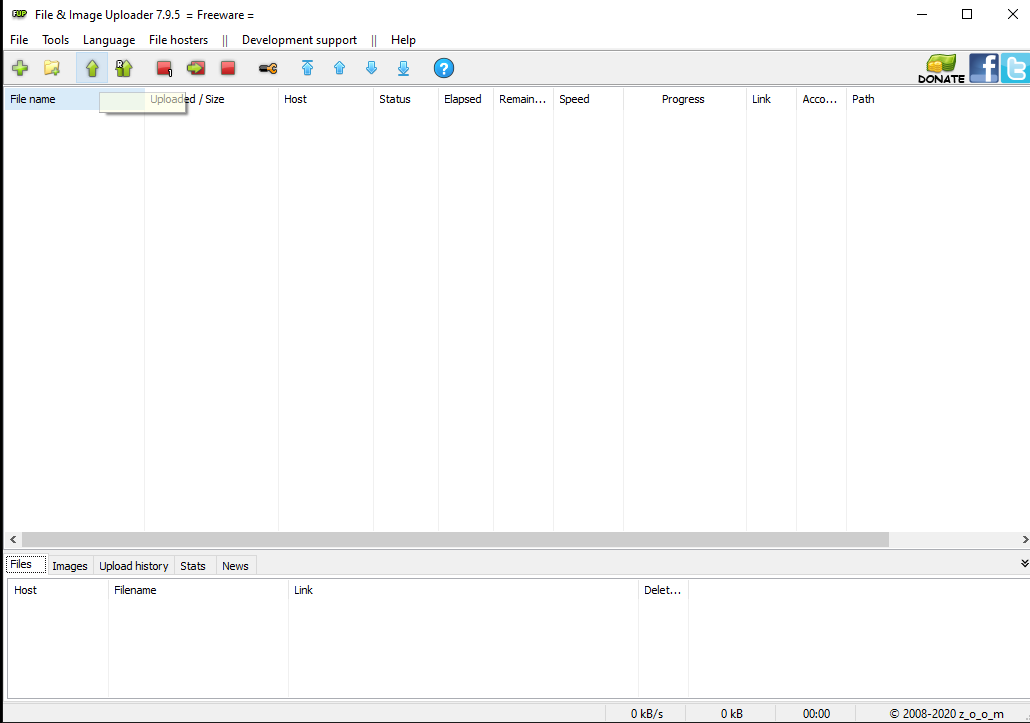
1) First Install Zoom and then Open the application
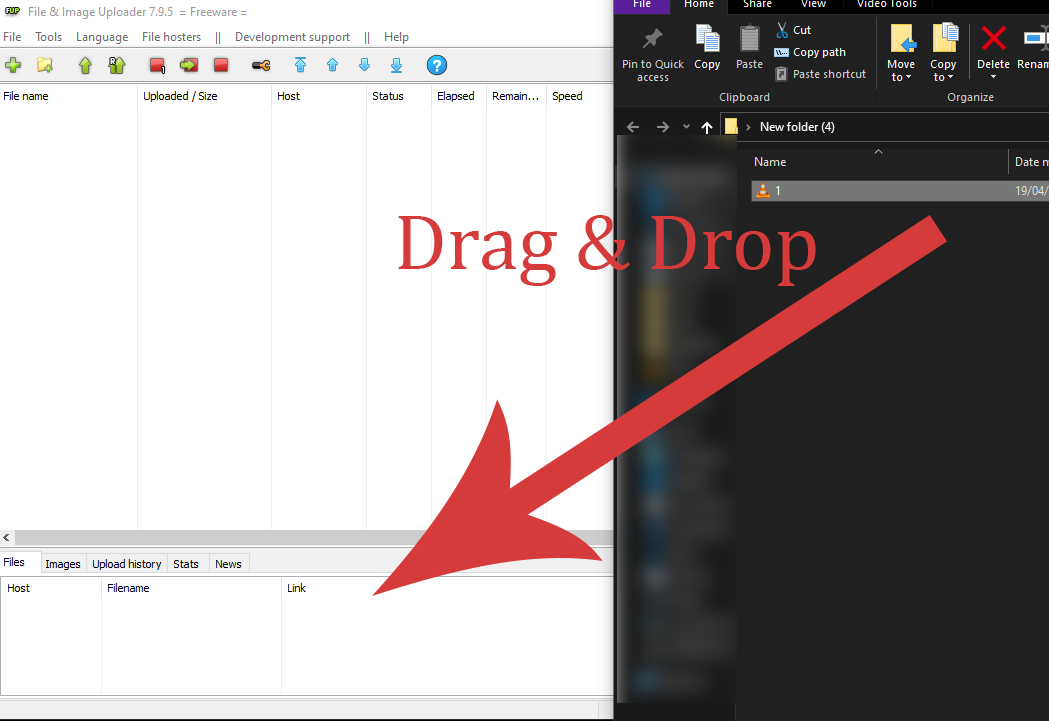
2) Ready your file
You can easily drag and drop the file on the app
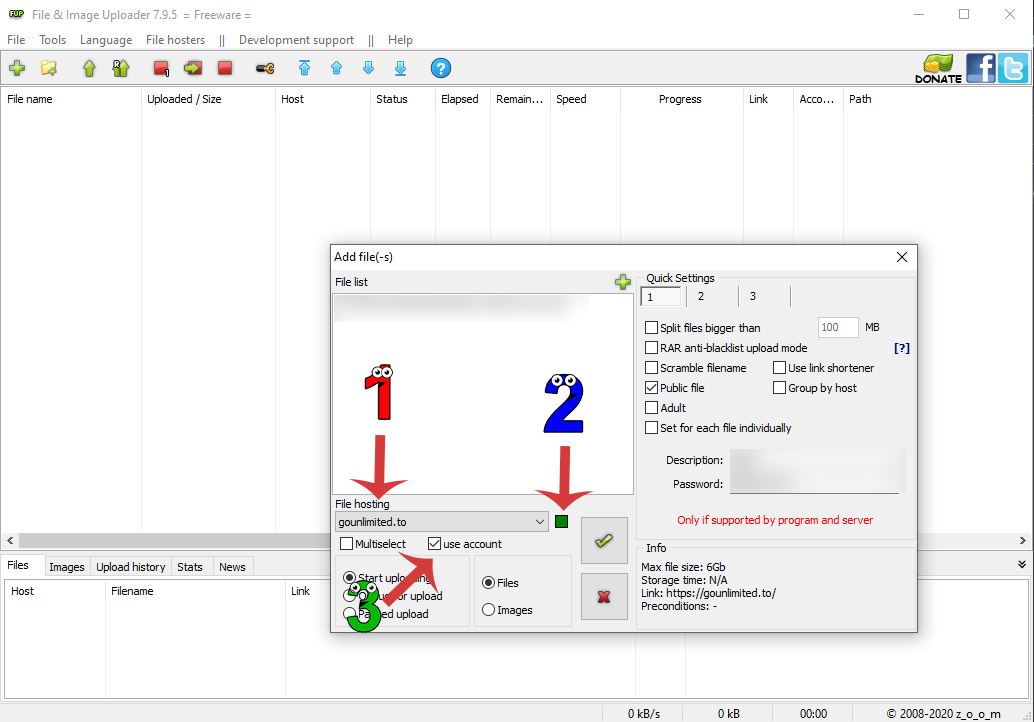
3)
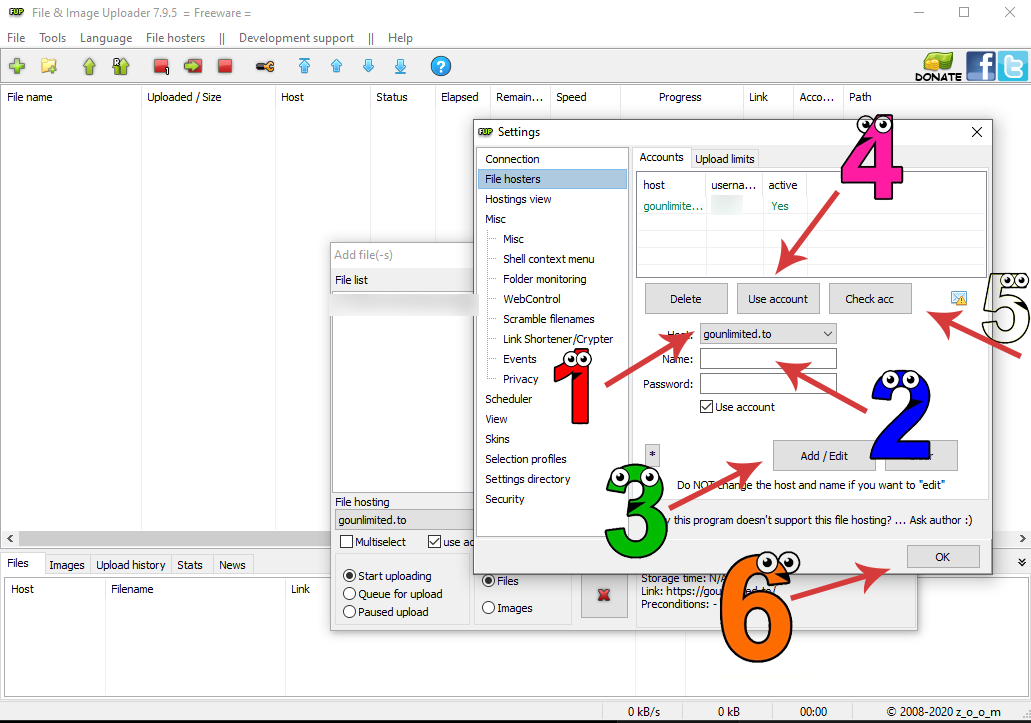
4)
5) Click the Checked Button to start uploading your file
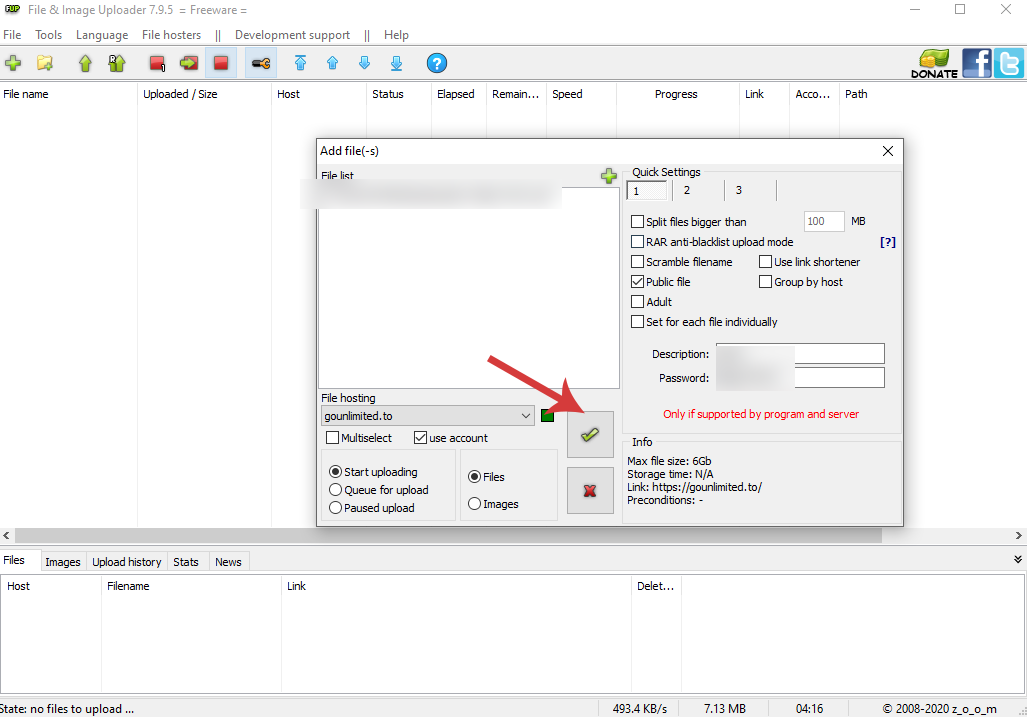
6) Voooila! Then your done
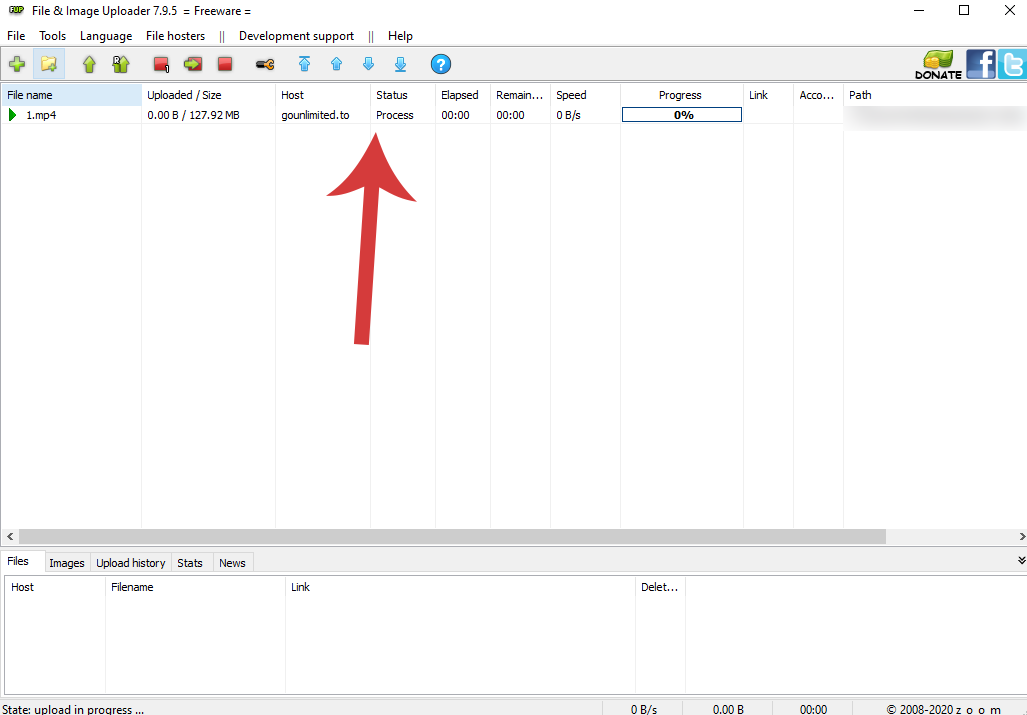
1) First Install Zoom and then Open the application
2) Ready your file
You can easily drag and drop the file on the app
3)
- choose gounlimited.to
- click the green button (that supposed to be white if you dont still have registered account)
- be sure the use account is checked
4)
- choose gounlimited.to
- enter your gounlimited.to account
- click add/edit
- use account
- check your account
- click okay
5) Click the Checked Button to start uploading your file
6) Voooila! Then your done
GO Unlimited
Active Member
Please check @Gaffar MughalHow to Use Zoom
1) First Install Zoom and then Open the application
2) Ready your file
You can easily drag and drop the file on the app
3)
- choose gounlimited.to
- click the green button (that supposed to be white if you dont still have registered account)
- be sure the use account is checked
4)
- choose gounlimited.to
- enter your gounlimited.to account
- click add/edit
- use account
- check your account
- click okay
5) Click the Checked Button to start uploading your file
6) Voooila! Then your done
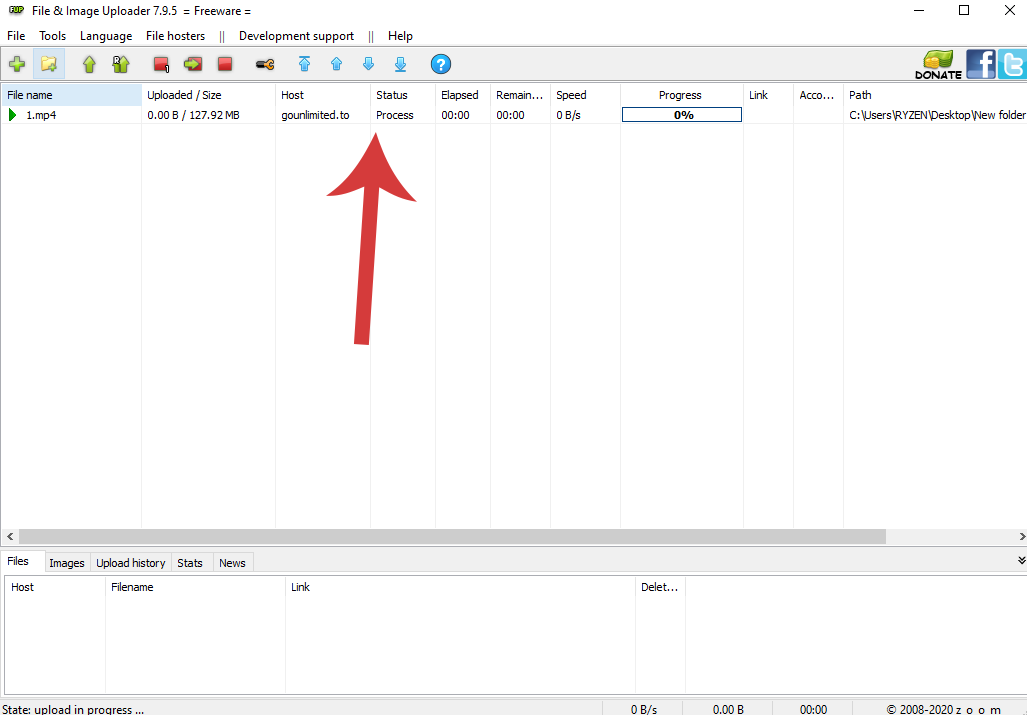
I will bookmark this guide so we use it in the future.
I will also copy the images and create a page on our website for this guide.
THANK YOU MAN @haunderv !!!


jamesrocky
Active Member
Started using GoUnlimited recently though my gounlimited acct is old and also a Trusted member. Did a good thing coming back to GoUnlimited. Got my First Payment today. Never thought I would receive payment in just few hours after the request.
Awesome host and great service. I appreciate all the hardwork you guys are doing. Please don't stop doing what you are trying to do. I am sure you guys are going to rock even more :P

Awesome host and great service. I appreciate all the hardwork you guys are doing. Please don't stop doing what you are trying to do. I am sure you guys are going to rock even more :P

HeatherLee
Active Member
You can even turn off all the other servers so that only go is available.
1. Click Tools

2. Select "Hosting View"
3. Right click in either column of the 2 right columns.

4. Click "Deselect all"
5. Find "gounlimited.to" & select it

6. Click OK
Now that will be the default option that will show up in your hosting section

1. Click Tools
2. Select "Hosting View"
3. Right click in either column of the 2 right columns.
4. Click "Deselect all"
5. Find "gounlimited.to" & select it
6. Click OK
Now that will be the default option that will show up in your hosting section

Gaffar Mughal
Active Member
THANK YOU MAN haunderv
All the user who is using go they are great persons.
I love those guys who are using go
All the user who is using go they are great persons.
I love those guys who are using go
Post automatically merged:
Thanks you sirYou can even turn off all the other servers so that only go is available.
1. Click Tools
2. Select "Hosting View"
3. Right click in either column of the 2 right columns.
4. Click "Deselect all"
5. Find "gounlimited.to" & select it
6. Click OK
Now that will be the default option that will show up in your hosting section
you're most welcome Boss!Please check @Gaffar Mughal
I will bookmark this guide so we use it in the future.
I will also copy the images and create a page on our website for this guide.
THANK YOU MAN @haunderv !!!
Thank you for your hardwork and dedication Boss
Thank you for creating Go
GO Unlimited
Active Member
Save some words, you have seen nothing yet. More coming on the way.Started using GoUnlimited recently though my gounlimited acct is old and also a Trusted member. Did a good thing coming back to GoUnlimited. Got my First Payment today. Never thought I would receive payment in just few hours after the request.
Awesome host and great service. I appreciate all the hardwork you guys are doing. Please don't stop doing what you are trying to do. I am sure you guys are going to rock even more :P


You guys deserve the best.
Post automatically merged:
Thank you for your time mate! I really appreciate your help in this guide.You can even turn off all the other servers so that only go is available.
1. Click Tools
2. Select "Hosting View"
3. Right click in either column of the 2 right columns.
4. Click "Deselect all"
5. Find "gounlimited.to" & select it
6. Click OK
Now that will be the default option that will show up in your hosting section

Phenomenal
Active Member
Did you check my PM?
GO Unlimited
Active Member
No PM in my end. Please pump it up.Did you check my PM?
Phenomenal
Active Member
PM sentNo PM in my end. Please pump it up.

ghashang90
Active Member
anyone has a list of Porn Sites where you can share GoU links ?
i have enough Stuff to share 720p/1080p/2060p directly after release much time to upload and share
i like Gou and would share more links from them
Search for porn names.
Search for porn names.
thats are stream sites all with porn in name ^^ like pornhub etc
on this kind of site i cant post my links ^^
ghashang90
Active Member
Forums are better for sharing.thats are stream sites all with porn in name ^^ like pornhub etc
on this kind of site i cant post my links ^^
But
The xvideos and youporn sites also has a high number of users.
Sign up and share the gounlimited link.
Phenomenal
Active Member
Post automatically merged:
GO Unlimited
Active Member
Thank you for sharing! Bounce credited.Post automatically merged:
- Status
- Not open for further replies.