Premium Streamup.cc - HLS CDN Streaming - $37/10000 views - Daily-Payouts - Custom Ads - Custom Domain

Streamup

Active Member
Corporate Membership
1,102
2024
673
3,260
Hi WJunction!

We'd like to introduce to you https://streamup.cc.

- About Hosting
  • Adult file content is allowed
  • No file expiry
  • Global CDN system for streaming your videos
  • Multiple ad modes
  • Automatic payouts

- FAQ

Q: How you service is different from other hosting sites ?
  • 4 Views are counted per 24 hours per user/IP
  • Multiple resolution - Your video will have 1080/720/360 Resolution.
  • Multi Earning Modes - You can select different earnings mode
  • No Expiry - Your files will be stored lifetime doesn't matter if you're big uploader or small one. As long as you don't abuse us.
  • Minimum Ads - Our 100% earning mode contains 5 pops.
Q: Do you ignore copyright ?
  • We don't our service is long term and we cannot ignore lawfully sent copyright takedown reports.
Q: What is minimum payout amount ?
  • 15$ for all payout methods.

- Our affiliate program can be found here: https://streamup.cc/affiliate
- Quick registration link: https://streamup.cc/register
- Payout options: Bitcoin, Litecoin, USDT TRC20
- ZOOM Uploader is SUPPORTED
- Multi Audio SUPPORTED
- We pay every day or 4 days max
 
Last edited:

3,390 comments
We've updated the preset mode, reviewing each of them each day to see which compress the file better.

But it seem both yesterday and today mode does the same compressions
The encode option loses its purpose if it doesn’t work, and I can’t choose which files I need the fastest, since every file you can download from the internet is already in the H.264 standard and still has to be re-encoded to H.264 anyway. It’s hard to be the first on the internet when a regular 500 MB file takes 1.4 hours to process not to mention that some of my files seem to have been skipped in the queue and are just stuck there xD
 
The encode option loses its purpose if it doesn’t work, and I can’t choose which files I need the fastest, since every file you can download from the internet is already in the H.264 standard and still has to be re-encoded to H.264 anyway. It’s hard to be the first on the internet when a regular 500 MB file takes 1.4 hours to process not to mention that some of my files seem to have been skipped in the queue and are just stuck there xD
if it's encoding the video and is H.264 then this video is definitely not AAC audio codec, but an hour ago we have changed the preset mode back to "veryfast", we used "faster" preset mode thinking the compressions may be a bit better, but it was only compressed by 0.5x compared to veryfast, at least with encoding the size is compressed already by 10-12x.

faster mode consume the servers resource a lot, but we did put queues limit before attaching it, if possible you can simply delete the current video which is in process, and reupload it, it shouldn't take more then 5 minutes to encode as we changed the preset mode.

not to mention, use ZOOM or web upload as we have advanced it's uploading architecture, FTP may be a little bad because we haven't done its architecture design, otherwise FTP upload may transfer the video to the encoding server which is already loaded with the faster mode video encoding now
 
Last edited:
if it's encoding the video and is H.264 then this video is definitely not AAC audio codec, but an hour ago we have changed the preset mode back to "veryfast", we used "faster" preset mode thinking the compressions may be a bit better, but it was only compressed by 0.5x compared to veryfast, at least with encoding the size is compressed already by 10-12x.

faster mode consume the servers resource a lot, but we did put queues limit before attaching it, if possible you can simply delete the current video which is in process, and reupload it, it shouldn't take more then 5 minutes to encode as we changed the preset mode.

not to mention, use ZOOM or web upload as we have advanced it's uploading architecture, FTP may be a little bad because we haven't done its architecture design, otherwise FTP upload may transfer the video to the encoding server which is already loaded with the faster mode video encoding now
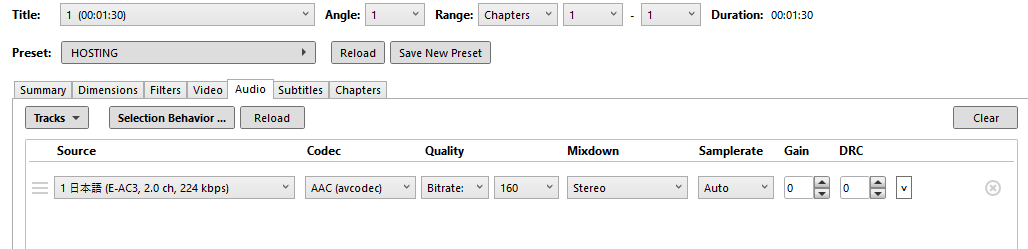
I just uploaded a test file with those settings , and the conversion still starts anyway(32mb and still freeze at 0%).


md2aX2U.png

TW0WW8j.png

gov26sb.png


It used to work fine with this preset before. Even when I downloaded a video from the internet using a video scraper, it didn’t need to be converted.
 
I just uploaded a test file with those settings , and the conversion still starts anyway(32mb and still freeze at 0%).


md2aX2U.png

TW0WW8j.png

gov26sb.png


It used to work fine with this preset before. Even when I downloaded a video from the internet using a video scraper, it didn’t need to be converted.
Uploaded used FTP or Web/ZOOM?
 
Strange, the skipping encoding server CPU was at 0%, i updated your account settings to Re-encode.

I saw this video and according to the metadata it extracted it said to be skipped for encoding but strange. Please try reupload and this video will be transferred to working encoding servers
 
Back
Top