Need HElP iN RDP!

Status
Not open for further replies.

MiSiON

Active Member
965
2011
358
0
Hi,

i really need help in RDP ..... i wanna use RDP ... i have tried 2-3 demo from different provider (awesome RDP & more) .... but in pc RDP running to much slow. i cant even work, its got hang for 40-60 sec after every click.

what is the minimum speed i need to use RDP normally ?

or any other thing i have to do ?

BTW, i m using 512KB/s Broadband connection which have 60-70 download speed & 20 UP speed.

PLZ help me guys.

Thanks.
 
9 comments
I'm not sure if you actually mean 60 seconds or it just feels like it.

It did feel like it to me also with my first RDP.

So if this is your first RDP then I guess you'll just get used to it with time and if not then i think the 512 might have a little thing to do with it.
 
I'm not sure if you actually mean 60 seconds or it just feels like it.

It did feel like it to me also with my first RDP.

So if this is your first RDP then I guess you'll just get used to it with time and if not then i think the 512 might have a little thing to do with it.
its actually takes 40 sec up ... just got hang after every click.

helpless fellin
 
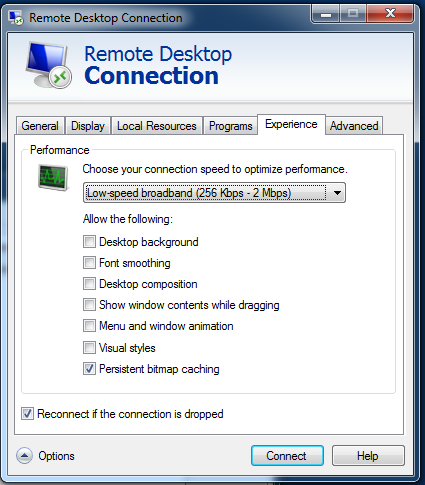
ping is the worst offender for laggy remote desktops. I've had some shitty ones in my time, and it never took anything like double digits to do anything, let alone a whole minute. I would suggest reducing the settings:

NKCJ0.png


Other than that, you're stuck by your limited upload speed. 512k should be sufficient to return a response at an acceptable rate.
 
what is your rdp desktop theme if its a crappy one then its ok if its a good 1 then change it a crappy 1 as when i had an rdp the good theme slowed it down
 
if you browse sites in rdp (like you do in your pc) then it will be slow response.

normally RDP requires min 1mbps speed and 2mbps would be better.

you can also ping and check the msec between you pc to rdp server. it should be less than 350msec.
 
check tracert and ping results. If there is too much hop count and ping is high then you need to get better internet connection.
 
Status
Not open for further replies.
Back
Top