LOADVID.COM - UP to 45$/10K Views | Fast Support | 15% on first payments and 10% on renewals

loadvid.com

Active Member
57
2025
13
550
Premium-Video-Hosting-Monetization-Platform-2.png


LoadVid is a next-generation video sharing and monetization platform built for creators, reuploaders, and content marketers.


With blazing-fast performance powered by S3 Storage and industry-leading payouts, LoadVid helps you turn video traffic into real income — easily.


💸 Top-Tier Earnings – Up to $45 per 10K Views​


  • Earn up to $45/10,000 views in Tier 1 countries (🇺🇸 🇨🇦 🇦🇺 🇬🇧).
  • Tier 2,3 and 4 countries still offer competitive CPMs.
  • Views are counted fairly: max 4 views/IP/24h, no bots, no ad blockers allowed.
    🔗 See full payout rates →


⚡ High-Speed Streaming Powered by S3 Storage​


  • All videos are stored on S3 Storage + Global CDN for smooth, fast playback worldwide.
  • Supports MP4, MKV, WEBM, etc., with HLS adaptive streaming for any device.
    🔗 See how it works →


🎯 Flexible Ad Experience & Premium Options​


  • Free users will see ads (required to generate revenue).
  • Users can upgrade to Premium or Enterprise to:
    • Remove ads completely
    • Control ad frequency
    • Use custom ad codes (Enterprise only)
    🔗 Upgrade Plans →


🤝 Referral Program – Earn Even More​


  • Get 15% commission from your referrals' first earnings
  • Then 10% lifetime commission — passive income that keeps growing
    🔗 Referral rules →


🔒 Safe, Legal & Adult-Friendly​


  • Adult content is allowed — but strictly no CP or illegal material.
  • Clear TOS and copyright policy: only upload what you own or have permission to use.
    🔗 Terms of Service →


💳 Payouts Made Easy​


  • Withdraw earnings via PayPal, USDT (TRC20), Payoneer, or PingPongX
  • Minimum payout as low as $25–$51, depending on method
    🔗 Full payout info →


🎬 Ready to Start?​


  1. Sign up for free at LoadVid.com
  2. Upload or remote your video
  3. Share the link & earn from every view!

Whether you're a creator, reuploader, or traffic expert — LOADVID helps you turn views into real money.
 
163 comments
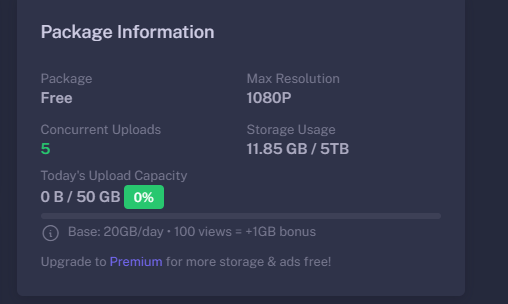
The description mentions no limits on storage capacity or on deleting videos without views, but the premium plans tab already lists limits for regular users, such as “5TB of storage space.”

 
image.png


You might be misunderstanding a bit.

On our service, storage itself is unlimited — there’s no hard cap like 5TB or anything like that. The only thing we limit is the daily upload for accounts without views:
  • If your videos don’t get any views, you can upload up to 50GB per day
  • This limit resets every day
  • Once your content starts getting views, your upload capacity will increase automatically
So it’s not a storage limit — it’s just a temporary daily upload cap for inactive content 👍
 
image.png


You might be misunderstanding a bit.

On our service, storage itself is unlimited — there’s no hard cap like 5TB or anything like that. The only thing we limit is the daily upload for accounts without views:
  • If your videos don’t get any views, you can upload up to 50GB per day
  • This limit resets every day
  • Once your content starts getting views, your upload capacity will increase automatically
So it’s not a storage limit — it’s just a temporary daily upload cap for inactive content 👍


It says “Storage space,” not “daily upload limit”.

Even in the screenshot you just posted, you can see “Upload Capacity 50 GB” and, separately, “Storage usage” with a limit of 5 TB.
I also noticed that there’s no option to delete or rename a folder.

When there are a lot of files or folders, the pagination is also annoying—it’s always set to 10 by default, and I have to change it to 200 every time.
 
It says “Storage space,” not “daily upload limit”.

Even in the screenshot you just posted, you can see “Upload Capacity 50 GB” and, separately, “Storage usage” with a limit of 5 TB.
I also noticed that there’s no option to delete or rename a folder.

When there are a lot of files or folders, the pagination is also annoying—it’s always set to 10 by default, and I have to change it to 200 every time.
We will update the homepage today and upgrade some minor functions as well.
Post automatically merged:

It says “Storage space,” not “daily upload limit”.

Even in the screenshot you just posted, you can see “Upload Capacity 50 GB” and, separately, “Storage usage” with a limit of 5 TB.
I also noticed that there’s no option to delete or rename a folder.

When there are a lot of files or folders, the pagination is also annoying—it’s always set to 10 by default, and I have to change it to 200 every time.
image.png

For Rename | Delete Folder - Click on the three-dot icon

And you can try change 10 videos to 50, 200 and reload the page, it will keep your number
 
Last edited:
Back
Top