How To Instal OpenVPN Server On Windows?

Status
Not open for further replies.

DuckBre

Active Member
339
2011
25
0
Hey guys , i need help instaling and runing OpenVPN server on my server runing Windows 7. I can't find tutorials how to do it anywhere all i could find is how to instal it on linux distributions but not on windows. :/
So if anyone got a link to a tutorial how to do it on windows or if you know how to do it please help me out.
 
10 comments
Well, i managed to start server and all but i don't have success in connecting to it from my client side it just shows empty open window. Any ideas?
 
Check if your Port is open ?

checked and its closed(acctually its stelth), i tried to add port to windows firewall but that didn't work than i turned windows firewall off but that didnt work either :/ any other suggestions? im trying to open port 443
 
Last edited:
are you shure you want to use 443?
UDP 1194 is the normal port.

for windows firewall:
open your management -> go to advanced settings -> create a rule for incoming and outgoing traffic.
-> reload your firewall

how do you try to connect to your server?
if you're on the same network and try to connect to dyndns, win7 will block this try.

have you opend the port on your router?
 
are you shure you want to use 443?
UDP 1194 is the normal port.

for windows firewall:
open your management -> go to advanced settings -> create a rule for incoming and outgoing traffic.
-> reload your firewall

how do you try to connect to your server?
if you're on the same network and try to connect to dyndns, win7 will block this try.

have you opend the port on your router?

Yes i want to use 443 tcp since i want to use that openvpn for personal usage on my pc since im behind colledge proxy which has only few ports opend amongs which is 443.

I tried that with windows firewall earlier but didn't work.

You need to open port on your modem side , do 192.168.1.1 login and add ports ?

I do not have access to router since im trying to do this on a remotly windows 7 dedicated server.
 
hum. where's your server now?
is it public? If yes, then it should work. But then there's the question: why do you have "windows 7" as server OS.
Your win7 server has to have a public ip and not a proxy ip or sth. else.

if you want to try to connect to your win7 machine within the college:
you have to say your router, that all requests coming to it's interface on 433 have to be routet to your pc.
otherwise you're not albe to do so.
some colleges gives out a public IP (due to some right-stuff).
then automatically all ports are forwarded to your PC.
if your college don't do s.th. like this (which the normally only do if they are big enough) you won't have a chance to set up a VPN.
 
I think you missunderstood me, im not trying to setup openvpn server on pc that is inside colledge network im trying to set it up on dedi server i rent outside of colledge network which has static ip adress and im already hosting a webserver on it without any problems.

Purpose of this is to use be able to connect to that openvpn server using openvpn client on my pc which is inside colledge's network.
Because to use internet on this colledge network i have to use it through proxy which filters classic stuff like porn, gambling and torrents.
I did use some free openvpn providers but they didn't have good enough speed and since i already have a dedi machine i though why not host openvpn server on it.

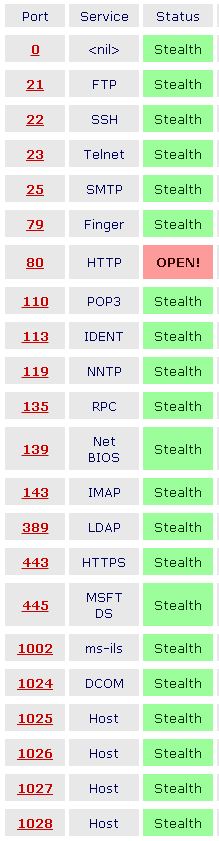
This is a current state of some ports on this dedi server of mine.

KmPqr5u.jpg
 
ah okay. sorry.

this looks like, your windows firewall is blocking the access on 443

have you double-checked, that you have a rulein your firewall that will allow openvpn and/or 443?
 
Status
Not open for further replies.
Back
Top