





Hi guys,
I was having trouble on my menu on wordpress using IE. My clients said that it needs to fix for IE. I was trying to google for a solution but no luck. Hope you can help me with this. See screenshot.
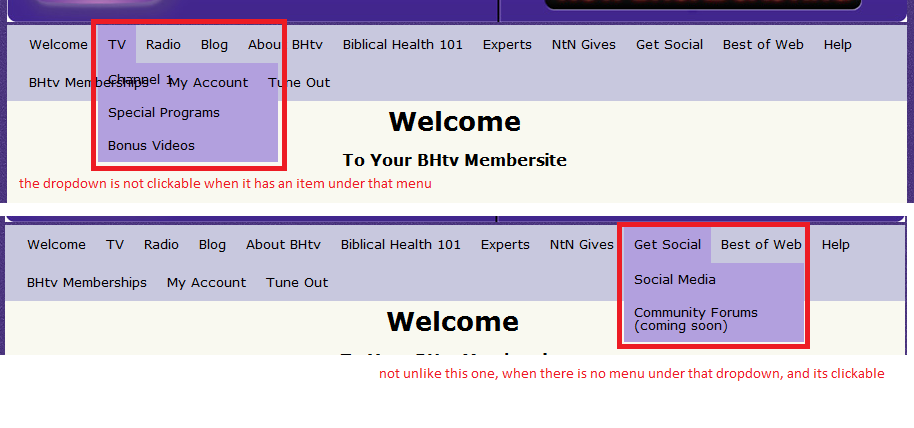
this is my CSS.
Please help me guys! :facepalm:
I was having trouble on my menu on wordpress using IE. My clients said that it needs to fix for IE. I was trying to google for a solution but no luck. Hope you can help me with this. See screenshot.
this is my CSS.
Code:
/* =Menu

-------------------------------------------------------------- */


#access {

	background: #C8C8DE;

	margin: 0 auto;

	width: 100%;/*940px;*/

	display:block;

	float:left;

}

#access .menu-header,

div.menu {

	font-size: 13px;

	margin-left: 12px;

}

#access .menu-header ul,

div.menu ul {

	list-style: none;

	margin: 0;

}

#access .menu-header li,

div.menu li {

	float:left;

	position: relative;

}

#access a {

	display:block;

	text-decoration:none;

	color:#000;

	padding:0 10px;

	line-height:38px;

}

#access ul ul {

	display:none;

	position:absolute;

	top:38px;

	left:0;

	float:left;

	box-shadow: 0px 3px 3px rgba(0,0,0,0.2);

	-moz-box-shadow: 0px 3px 3px rgba(0,0,0,0.2);

	-webkit-box-shadow: 0px 3px 3px rgba(0,0,0,0.2);

	width: 180px;

    z-index: 99999;

}

#access ul ul li {

	min-width: 180px;

}

#access ul ul ul {

	left:100%;

	top:0;

}

#access ul ul a {

	background:#B2A0DE;

	height:auto;

	line-height:1em;

	padding:10px;

	width: 160px;

}

#access li:hover > a,

#access ul ul :hover > a {

	color:#000;

	background:#B2A0DE;

}

#access ul li:hover > ul {

	display:block;

}

#access ul li.current_page_item > a,

#access ul li.current-menu-ancestor > a,

#access ul li.current-menu-item > a,

#access ul li.current-menu-parent > a {

	color: #000;

}


* html #access ul li.current_page_item a,

* html #access ul li.current-menu-ancestor a,

* html #access ul li.current-menu-item a,

* html #access ul li.current-menu-parent a,

* html #access ul li a:hover {

	color:#000;

}
Please help me guys! :facepalm:
