




Hello
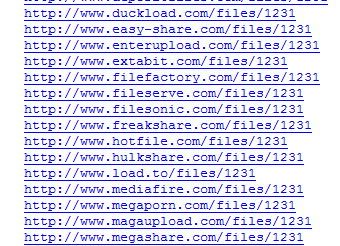
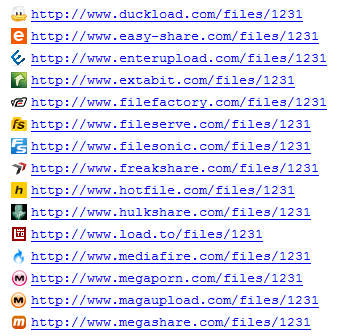
I create Stylish user style that add favicons to file hosts links.
Working with:
2shared.com, 4shared.com, badongo.com, bitshare.com, box.net, depositfiles.com, duckload.com, easy-share.com, enterupload.com, extabit.com, filefactory.com, fileserve.com, filesonic.com, freakshare.com, hotfile.com, hulkshare.com, load.to, magaupload.com, mediafire.com, megaporn.com, megashare.com, midupload.com, mirrorcreator.com, multiupload.com, oron.com, rapidshare.com, sendspace.com, sharebase.to, sharecash . org, turbobit.net, uploaded.to, uploading.com, x7.to, ziddu . com, zippyshare.com, zshare.net
I create Stylish user style that add favicons to file hosts links.
Working with:
2shared.com, 4shared.com, badongo.com, bitshare.com, box.net, depositfiles.com, duckload.com, easy-share.com, enterupload.com, extabit.com, filefactory.com, fileserve.com, filesonic.com, freakshare.com, hotfile.com, hulkshare.com, load.to, magaupload.com, mediafire.com, megaporn.com, megashare.com, midupload.com, mirrorcreator.com, multiupload.com, oron.com, rapidshare.com, sendspace.com, sharebase.to, sharecash . org, turbobit.net, uploaded.to, uploading.com, x7.to, ziddu . com, zippyshare.com, zshare.net
Before:
After:
You can get it here: http://userstyles.org/styles/42698
Test site:
http://dl.dropbox.com/u/933/favicons/testlinks.html
You can also add it to your site with css:
http://dl.dropbox.com/u/933/favicons/testlinks2.html (check source)
http://dl.dropbox.com/u/933/favicons/testlinks3.html (check source)
If you have any request post here or on userstyles.org.
Cheers
After:
You can get it here: http://userstyles.org/styles/42698
Test site:
http://dl.dropbox.com/u/933/favicons/testlinks.html
You can also add it to your site with css:
http://dl.dropbox.com/u/933/favicons/testlinks2.html (check source)
http://dl.dropbox.com/u/933/favicons/testlinks3.html (check source)
If you have any request post here or on userstyles.org.
Cheers
 any1 want?