Guest viewing limit reached
- You have reached the maximum number of guest views allowed
- Please register below to remove this limitation
- Already a member? Click here to login


You are using an out of date browser. It may not display this or other websites correctly.
You should upgrade or use an alternative browser.
You should upgrade or use an alternative browser.
Magic Picture
- Thread starter Tɦɛ Gʀiɱ
- Start date




- Status
- Not open for further replies.

Or open in windows image viewer even
Yea true.
stopped getting fooled guys..its just a .htaccess mod.
when you open in this page,the file is being hotlinked from the url.but when you download it,you are directly accessing pic on THEIR domain(which is not hotlinking).just see the following url to get my point.they can modify what file is served.
http://altlab.com/htaccess_tutorial.html
http://www.hongkiat.com/blog/smarter-way-to-prevent-image-hotlinking-with-htaccess/
In short,
Htaccess allows you to
1.display custom images detecting image hotlinking
2.display original image for a given referrer(s)
RESULT: Its no mind game,its just some clever guy out there who must be laughing the shit out of himself looking at threads simliar to this everywhere.
when you open in this page,the file is being hotlinked from the url.but when you download it,you are directly accessing pic on THEIR domain(which is not hotlinking).just see the following url to get my point.they can modify what file is served.
http://altlab.com/htaccess_tutorial.html
http://www.hongkiat.com/blog/smarter-way-to-prevent-image-hotlinking-with-htaccess/
In short,
Htaccess allows you to
1.display custom images detecting image hotlinking
2.display original image for a given referrer(s)
RESULT: Its no mind game,its just some clever guy out there who must be laughing the shit out of himself looking at threads simliar to this everywhere.
Last edited:
Sorry! But your theory failed! Your reply is completely wrongstopped getting fooled guys..its just a .htaccess mod.
when you open in this page,the file is being hotlinked from the url.but when you download it,you are directly accessing pic on THEIR domain(which is not hotlinking).just see the following url to get my point.they can modify what file is served.
http://altlab.com/htaccess_tutorial.html
http://www.hongkiat.com/blog/smarter-way-to-prevent-image-hotlinking-with-htaccess/
In short,
Htaccess allows you to
1.display custom images detecting image hotlinking
2.display original image for a given referrer(s)
RESULT: Its no mind game,its just some clever guy out there who must be laughing the shit out of himself looking at threads simliar to this everywhere.
I even thought so at first, but it isn't like that. The picture is uploaded on some public image host.
Want more test?
Download the image
Reupload on your website
Hotlink it in any page
Live example:
http://i.imgur.com/0zPaI
Linked from imgur:

stopped getting fooled guys..its just a .htaccess mod.
when you open in this page,the file is being hotlinked from the url.but when you download it,you are directly accessing pic on THEIR domain(which is not hotlinking).just see the following url to get my point.they can modify what file is served.
http://altlab.com/htaccess_tutorial.html
http://www.hongkiat.com/blog/smarter-way-to-prevent-image-hotlinking-with-htaccess/
In short,
Htaccess allows you to
1.display custom images detecting image hotlinking
2.display original image for a given referrer(s)
RESULT: Its no mind game,its just some clever guy out there who must be laughing the shit out of himself looking at threads simliar to this everywhere.
Stupid person i ever saw.
---------- Post added at 09:05 AM ---------- Previous post was at 09:04 AM ----------
its not. Comeon. Just change the brightness and contrast (-150,100 for good results) and you will see the other image.
You are 100% correct bro. <3
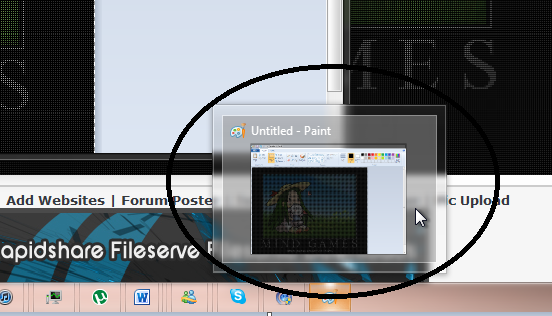
Ok mate B-)
Better way:its not. Comeon. Just change the brightness and contrast (-150,100 for good results) and you will see the other image.
change RGB level to 235 :D
Perfectly working
MyDarkTower
Active Member
LOL I didnt see any difference untill I saw this with my computer. You can see the same image thru my phone. I opened this thread with my computer and I saw the girl and her bunny and said WTF?
Explanation:
Starting with the image in paint, the trees. They clearly have a white grid of pixels (i.e. every other pixel appears to be white).
In actual fact, these 'white' pixels are coloured pixels with a maximum value and very low saturation (using the HSV model), meaning they are coloured but have maximum brightness so appear white.
Decreasing the saturation and value of all pixels causes the 'white' ones to become visible (coloured) and the originally coloured ones become black.
Why browsers display the pixels differently to other applications, im not sure, but that's the explanation of how, just not the why.
Starting with the image in paint, the trees. They clearly have a white grid of pixels (i.e. every other pixel appears to be white).
In actual fact, these 'white' pixels are coloured pixels with a maximum value and very low saturation (using the HSV model), meaning they are coloured but have maximum brightness so appear white.
Decreasing the saturation and value of all pixels causes the 'white' ones to become visible (coloured) and the originally coloured ones become black.
Why browsers display the pixels differently to other applications, im not sure, but that's the explanation of how, just not the why.

snapshot:

Btw, awesome
And nothing to do with htaccess, same image from HDD,one in browser, other in paint:
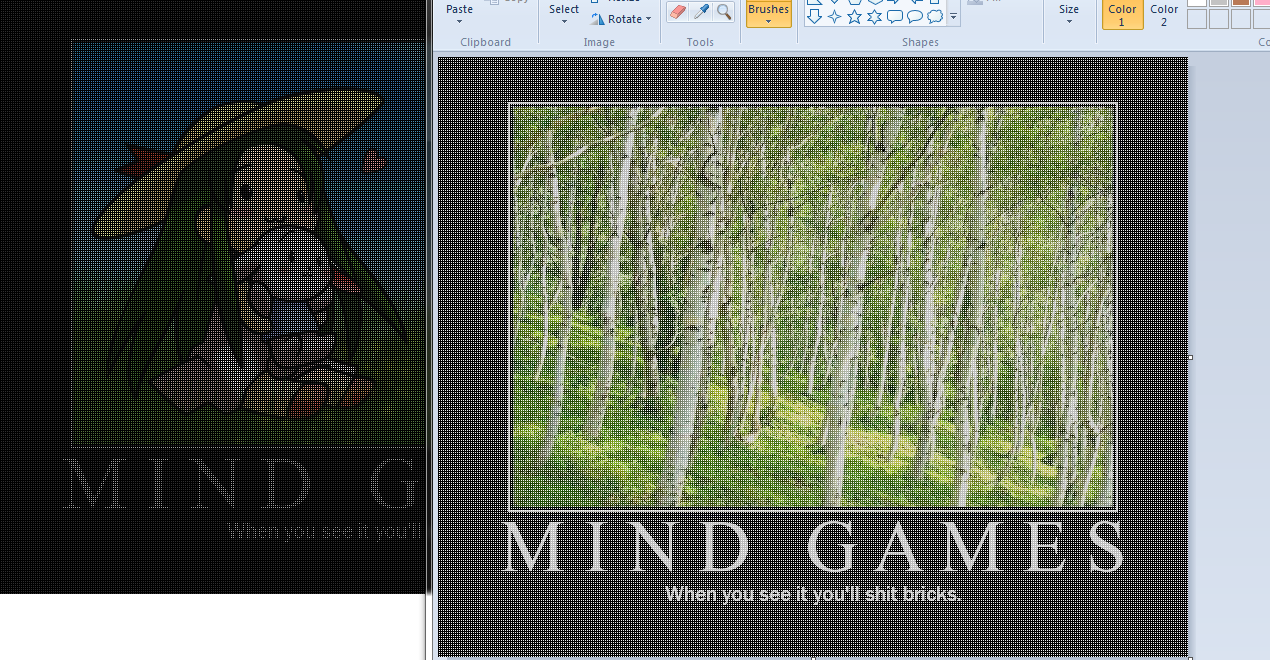
And I shat entire house....
Quoted for truth, i still cant believe there are fools like him who said htaccess in an image LOL.

- Status
- Not open for further replies.