




This is a result of people complaining about the new FileServe advert and saying it looks ugly so here's a Google Chrome Extension that will remove the Adverts from WJunction.
First things first here's the thing we're going to make
https://chrome.google.com/webstore/detail/hamkmpinammdemgiieljfmnneplgndno
The whole thing takes less than 5 minutes and is really easy to make. It won't break when you update Google Chrome either unlike FireFox. It shows how easy it is to make Google Chrome Extensions.
All we need is two files for this as all we're doing is modifying the CSS. The CSS file is what controls the appearance, layout and color of a page encase you didn't know.
The other other file is a .json file that tells Google Chrome what to do. To make a .json file you can just copy and paste below into notepad and after you've saved it change it from a .txt to a .json
Here's the .json file
So we have a name which is simple enough. A version number which is useful if you want to release an update and a bit of a description. The matches part is the website you want the css file to match which in this case is wjunciton. The next is the css file. I've just called the CSS file advert but that's not important.
Next we need the CSS file.
You have to have basic CSS knowledge to find these. The subBar is the name of the div that contains the adverts in the header. The .smallfont div img are the small images on the index that advertise file hosts and the iframe one is the iframe advert in the file host area.
Easy enough so far?
Next we just pack it. Easiest thing to do which will also check for errors is pack the two files in Chrome. Go to your extensions page activate developer mode and click pack extension. That creates a file for you.
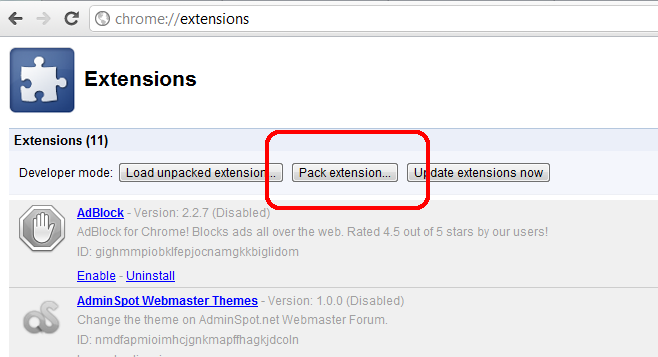
Alternatively you can just zip the two files and upload them to the Google Webstore. A little warning you have to pay $5 initially to get a developer account on the Webstore. It's like a security thing but once you pay the $5 you can create as many extensions as you want.
In the webstore you can add screenshots, icons, a description, google tracking code to see how many use it etc. You can also have tester accounts before you release it along with loads of other features.
So ya again here is the finished project. Feel free to rate it 5 stars on Google if you like it
https://chrome.google.com/webstore/detail/hamkmpinammdemgiieljfmnneplgndno
If you create a good extension and you don't have a Google Webstore account I can upload it for you if it follows all Google's guidelines.
First things first here's the thing we're going to make
https://chrome.google.com/webstore/detail/hamkmpinammdemgiieljfmnneplgndno
The whole thing takes less than 5 minutes and is really easy to make. It won't break when you update Google Chrome either unlike FireFox. It shows how easy it is to make Google Chrome Extensions.
All we need is two files for this as all we're doing is modifying the CSS. The CSS file is what controls the appearance, layout and color of a page encase you didn't know.
The other other file is a .json file that tells Google Chrome what to do. To make a .json file you can just copy and paste below into notepad and after you've saved it change it from a .txt to a .json
Here's the .json file
PHP:
{
  "name": "Remove WJunciton Advert",
  "version": "1.0",
  "description": "Removes the Top Adverts from WJunciton.com",
  "content_scripts": [
    {
      "matches": ["http://www.wjunction.com/*"],
      "css": ["advert.css"]
    }
  ]
}
So we have a name which is simple enough. A version number which is useful if you want to release an update and a bit of a description. The matches part is the website you want the css file to match which in this case is wjunciton. The next is the css file. I've just called the CSS file advert but that's not important.
Next we need the CSS file.
Code:
#subBar{display:none;}
.smallfont div img{display:none;}
.contentWrapper div iframe{display:none;}
You have to have basic CSS knowledge to find these. The subBar is the name of the div that contains the adverts in the header. The .smallfont div img are the small images on the index that advertise file hosts and the iframe one is the iframe advert in the file host area.
Easy enough so far?
Next we just pack it. Easiest thing to do which will also check for errors is pack the two files in Chrome. Go to your extensions page activate developer mode and click pack extension. That creates a file for you.
Alternatively you can just zip the two files and upload them to the Google Webstore. A little warning you have to pay $5 initially to get a developer account on the Webstore. It's like a security thing but once you pay the $5 you can create as many extensions as you want.
In the webstore you can add screenshots, icons, a description, google tracking code to see how many use it etc. You can also have tester accounts before you release it along with loads of other features.
So ya again here is the finished project. Feel free to rate it 5 stars on Google if you like it
https://chrome.google.com/webstore/detail/hamkmpinammdemgiieljfmnneplgndno
If you create a good extension and you don't have a Google Webstore account I can upload it for you if it follows all Google's guidelines.
Last edited:
